Primary Keyword Strategy: How to Choose the Right Keyword
By RankTree Team · 2026-07-13 · Updated 2026-10-20
Part of the 15 Types of Keywords in SEO Everyone Must Know guide →
Choosing a topic to write about is easy. Choosing the right search term to build a page around is where most content plans fall apart.
Teams often pick a term because it "sounds right", publish the page and then wonder why it never ranks.
The real issue is usually one of three things: the term doesn't match what searchers actually expect the wrong tool was used to validate it or a more valuable variation was sitting right next to it in the data.
In this guide, you’ll learn how to find the right keyword using search intent, parent topic, and proven research methods that actually help pages rank.
A primary keyword is the single main search term a page is built around; it shapes the title, H1, URL, and structure, and tells search engines and readers in one glance what problem that page solves. Finding the right one starts with a broad seed keyword fed into tools like Google Keyword Planner, Ahrefs, or Semrush to surface real variations by match type, then validated against actual search intent by checking what is already ranking for it. The parent topic method goes further: identifying the higher-volume query driving traffic to the page ranking first often reveals a stronger term than instinct alone would suggest. From there, the term is applied naturally across the URL slug, title tag, opening paragraph, subheadings, meta description, and schema markup, with density kept around 0.5 to 1 percent. Getting this term wrong means a page either serves two intents and satisfies neither, or competes with another page on the same site.
Quick Answer: What Is a Primary Keyword?
A primary keyword is the main search term a page is built around. It defines your topic, matches user search intent and helps search engines understand when to rank your content. Choosing the right keyword using data, intent and parent topic is critical for getting traffic and rankings.
What a Primary Keyword Actually Does?
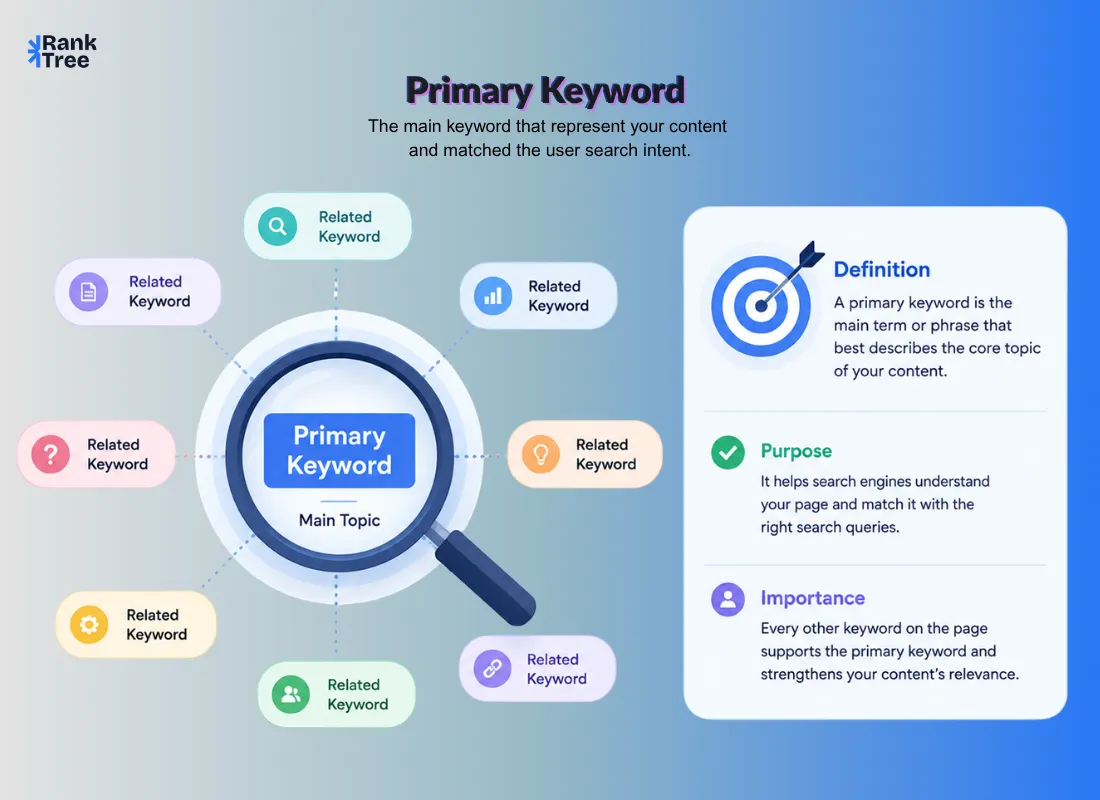
A Primary Keyword (sometimes called a target keyword, head keyword, seed keyword, main keyword or anchor keyword) is the single term a page is built to satisfy. It shapes the title, the H1, the URL and the structure of everything underneath it.
Its job isn't just to describe the topic. It tells search engines and readers in one glance what problem this specific page solves. Every other keyword on the page supporting phrases, questions related terms exists to reinforce that one core answer.
Get this term wrong and two things happen. Either the page tries to serve two different intents and satisfies neither or it competes with another page on your own site for the same query.
Step 1: Start With a Seed Keyword Not a Final Answer
Before you land on a target term you need a starting point: a broad simple phrase called a seed keyword. Think "email marketing" "invoicing software" or "team scheduling."
A seed keyword is never meant to be published as is. It's an input you feed into research tools to surface real variations, real volume data and real competition levels.
Skipping this step and guessing your main term directly is the single most common reason pages target the wrong phrase.
Step 2: Use the Right Tools to Validate It
Three tools dominate this process and each has a slightly different strength:
Google Keyword Planner free tied to actual ad auction data useful for a baseline volume check.
Ahrefs Keywords Explorer strong for competition level scoring and for a technique covered below (parent topic).
Semrush Keyword Magic Tool best for filtering large keyword lists by match type and intent in one view.
Inside these tools keywords are usually grouped by match type:
Broad match results containing your seed words in any order often with extra modifiers
Phrase match results containing your seed phrase as a close variation
Exact match results containing your seed phrase exactly
Related conceptually connected terms that don't contain your seed words at all
Filtering through these match types instead of scanning one long, unorganized list helps turn a vague topic idea into a validated, rankable keyword.
When you're working with larger keyword datasets, this process can quickly become time consuming. In that case, Ranktree can simplify the workflow by automatically grouping related terms and structuring them based on search intent.
This makes it easier to identify the right primary keyword using real data instead of relying on manual guesswork.
Step 3: Check Search Intent Before Anything Else
This is the step that gets skipped most often and it's the one that decides whether your page will ever rank regardless of how well it's written.
Every query on Google falls into one of four intent buckets:
Informational the searcher wants to learn something ("what is invoice automation")
Navigational the searcher wants a specific site or page ("[brand] login")
Commercial the searcher is comparing options before buying ("best invoicing software for freelancers")
Transactional the searcher is ready to act ("buy invoicing software")
Before finalizing a term, search it yourself and look at what's actually ranking. If the top 10 results are all comparison listicles and you're planning a plain definition page that mismatch will cap your ranking potential no matter how good the writing is. The SERP itself is the most reliable intent checking tool you have and it's free.
Step 4: The Parent Topic Method (Most Guides Skip This)
The parent topic method helps uncover better keyword opportunities than relying on instinct.
Look at the page ranking #1 for your target term and identify which higher volume query is driving most of its traffic. That query is the parent topic and it’s often a stronger keyword to target.
For example instead of “cold dinner” you might find “cold dinner ideas” has significantly higher search demand. Without this check you could target a weaker term without realizing it.
This one step can turn a low traffic page into one that captures much higher traffic using the same content.
Step 5: Decide Between Short Tail and Long Tail
Not every strong term is a short phrase and not every long phrase is weak.
Short tail (head) terms shorter phrases generally higher volume higher competition. Example: "home workouts."
Long tail terms longer more specific phrases lower individual volume but easier to rank for and often closer to a ready to convert searcher. Example: "home workout routines with no equipment."
A new website with limited authority is usually better served starting with long tail terms and working up to short tail terms once the domain has earned enough trust to compete for them.
Step 6: Mine Google's Own Suggestions
Beyond dedicated tools Google gives away intent data for free in three places:
Autocomplete type your seed term into the search bar and note what Google suggests as you add modifiers
People Also Ask the expandable question boxes on the results page which reflect real follow up queries
Related Searches the list at the bottom of the results page showing adjacent queries users also search for
Reverse engineering a competitor's ranking page is another underused method: pull the list of terms a top performing competitor page ranks for sorted by volume and you'll often find opportunities you wouldn't have thought to search for directly.
Step 7: Optimize the Page Once the Term Is Locked
With a validated term in hand apply it across these elements using natural phrasing not forced repetition:
URL slug: keep it clean and descriptive e.g. yourdomain.com/category/target term
Title tag and H1: place the term near the front ideally within the first few words
First paragraph: use it once within the opening 100 words
Subheadings: mix it with synonyms and related phrases rather than repeating it verbatim in every H2
Meta description: include it naturally to support click through
Image alt text: only where the image is genuinely relevant to the topic
Schema markup: add structured data relevant to the content type FAQ schema for question based sections Article schema for blog content and product specific schema (like SoftwareApplication schema for SaaS tools) where applicable. This is a step most keyword guides leave out entirely yet it directly affects whether your page becomes eligible for rich results.
Keep density natural roughly 0.5 –1% is a safe range. Beyond that, swap in synonyms and related phrases instead of repeating the exact term.
Grouping Terms Into Clusters Instead of One Off Pages
Once you've validated a handful of target terms using the process above don't treat them as a random list. Group them by topic into clusters:
One pillar page covers the broad category (e.g. "invoicing software")
Several supporting pages each target one validated term from that cluster (e.g. "invoicing software for freelancers" "invoicing software with recurring billing")
Each supporting page is internally linked back to the pillar and the pillar links out to each supporting page
Once your primary keyword is locked the remaining validated terms usually become that page's secondary keywords used to cover subtopics without creating new pages. For a deeper look at how primary and secondary keywords work together see our complete comparison.
Measuring Whether You Picked the Right Term
Validation doesn't stop at publishing. After a page has been live for four to six weeks check Google Search Console for two signals:
Impressions without clicks: The page is showing up for the term but the title or meta description isn't earning clicks. This usually means the term is right but the on page framing needs work.
Rankings stuck beyond position 15: This often signals a content depth issue rather than a keyword issue. Compare your page against the current top 10 and look for subtopics they cover that yours doesn't.
If a page starts pulling impressions for a related query you didn't originally target, that's a signal worth acting on to either expand the existing section covering it or spin it into its own supporting page if the intent is different enough to deserve one.
Stop guessing your primary keyword and use Ranktree to turn raw keyword data into clear, structured clusters.
A Quick Research Checklist
Before publishing run through this:
Started from a seed keyword not a guess
Checked match types (broad phrase exact related) in a keyword tool
Verified search intent by reviewing the actual top 10 results
Checked the parent topic for a possibly stronger variation
Decided short tail vs long tail based on current site authority
Reverse engineered at least one strong competitor page
Applied the term across title H1 URL intro meta description and schema without stuffing
FAQs
How many keywords should I analyze before choosing a primary keyword?
There is no fixed number but reviewing at least 20–50 related keyword variations gives you a clearer picture of search demand competition and intent. This helps you avoid picking a weak or misleading term.
Can two pages target closely related primary keywords?
Only if the search intent is clearly different. If Google shows similar results for both terms they should be covered on a single page to avoid keyword cannibalization.
What happens if I choose the wrong primary keyword?
Your page may get little to no traffic or rank for irrelevant queries. Even strong content struggles to perform if the keyword doesn’t align with user intent or search demand.
Should I update my primary keyword after publishing?
Yes, if data shows a better opportunity. If your page is getting impressions for a different but more valuable query you can adjust your content and positioning around that term.
Do keyword tools always give accurate data?
Keyword tools provide estimates not exact numbers. That’s why it’s important to validate keywords using actual SERP results, not just tool data.
Related reads
Secondary Keyword: Why the Top Ranking Page Rarely Ranks for Just One Term
Primary vs Secondary Keywords: How to Use Both to Rank Faster
What Is Keyword Mapping? A Practical Guide to Matching Keywords with the Right Pages
RankTree Team — The RankTree team writes about SEO strategy, keyword clustering, and topical authority to help you build content that ranks.