Content Keywords in Search Console: Find, Analyze and Rank
By RankTree Team · 2026-08-21 · Updated 2026-10-07
Part of the What Is a Content Keyword? How to Find Winning Keywords guide →
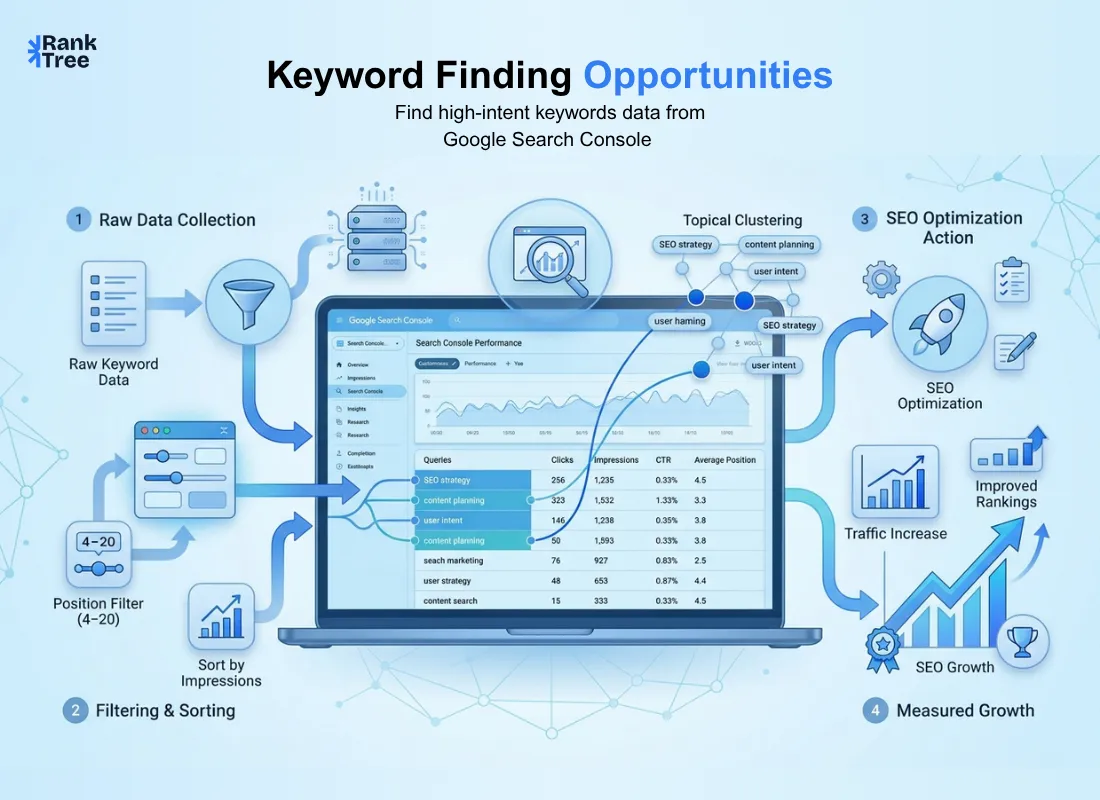
Most people treat Google Search Console as a basic reporting tool checking clicks and impressions then leaving. But the real opportunity lies in the keyword data already inside it.
If you searched for “content keywords search console” expecting a report here’s the truth: it no longer exists. It was part of the old interface. Today that data lives in the Performance report under the Queries tab and it’s far more valuable because it shows real search behavior not estimates.
These keywords are actual queries tied to impressions clicks and rankings making them one of the most reliable SEO insights available.
In this guide you’ll learn how to find high value keywords, prioritize them and turn Search Console data into rankings traffic and growth.
Content keywords in Search Console are the actual search queries that trigger your website in Google results, each carrying real performance metrics — impressions, clicks, click-through rate, and average position — pulled directly from Google rather than estimated by a third-party tool. The original "Content Keywords" report showed on-page word frequency crawled by Googlebot and was used for crawlability and spam checks, but Google retired it in November 2016 because it reflected page content, not real search behavior. It was replaced by the Performance report's Queries view, which reveals exactly what users typed and how well each query performs. High impressions with low clicks signal visibility without engagement; queries ranking just outside the top positions often mark the fastest wins. Filtering for position 4–15 with CTR below 3%, grouping queries into topical clusters, and mapping each to a specific on-page action turns this data into a genuine ranking opportunity.
What Was the "Content Keywords" Report?
Content Keywords was a report in the original Google Webmaster Tools (now Search Console). It showed the most frequently found words and phrases on your site, based on what Googlebot crawled essentially summarizing what your content was about through word frequency.
It was mainly used for two things:
Crawlability check. If the report was empty or showed irrelevant terms, it often meant Googlebot couldn’t properly read your pages.
Spam detection. Sudden appearance of unrelated or spammy keywords could indicate site hacking or content injection.
Google retired this report in November 2016 because it focused on page word frequency rather than real search behavior. It was replaced by more useful performance-based data in Search Console.
What Are Content Keywords in Search Console?
Content keywords in Search Console are the actual search queries users type into Google that trigger your website in results. Unlike traditional keyword tools that rely on estimates this data comes directly from Google.
Each keyword includes key performance metrics such as impressions clicks click through rate and average position helping you understand both visibility and engagement.
For example high impressions but low clicks suggest your content is being seen but not attracting attention. Meanwhile keywords ranking just outside top positions often indicate strong opportunities for quick optimization.
This makes Search Console a powerful tool for identifying what is working and where small improvements can create immediate impact.
What Replaced Content Keywords: The Performance Report?
The closest and far more useful replacement is the Performance report, especially the Queries view. Instead of showing on page word frequency it reveals the exact search terms users typed to find your site along with four key metrics:
Clicks how many users clicked through to your site
Impressions how many times your page appeared in search results
Average CTR (click through rate) clicks divided by impressions
Average position where your page typically ranks for that query
This data is far more valuable for content strategy. Word frequency shows what your page contains while query data reveals real user intent and how well your content satisfies it making this the report you should rely on today.
How to Find Keyword Opportunities: A Tool Neutral Process?
Here's a practical workflow for turning raw Performance report data into a real list of content keyword opportunities.
Step 1: Open the Performance Report
In the Search Console go to Performance > Search Results. Set the date range to the last 12 months rather than the 3-month default — a longer window smooths out seasonal noise and gives a realistic sample size — then enable the CTR and Average Position columns (they're hidden by default) alongside Clicks and Impressions.
Step 2: Filter for "Low Hanging Fruit" Keywords
The most efficient starting point is finding queries where you're already ranking reasonably well but not converting that ranking into clicks. Apply these filters:
Position between 4 and 15 (first or second page but not the top 3)
CTR below 3% (below average click performance)
Sort by Impressions descending
Queries that meet all three conditions are your priority list. They tell you exactly where a small ranking improvement, say moving from position 8 to position 4 could produce an outsized jump in traffic since click through rates rise sharply as you approach the top of page one.
Step 3: Group Queries Into Topical Clusters
Individual keywords don’t tell the full story alone. Export your query list (as a CSV or Google Sheet) and group similar queries by theme. For example “search console keyword research” “gsc content keywords” and “find keywords search console” all fall under the same topic cluster despite being different queries.
You can group them manually with pivot tables or using clustering tools. This helps reveal which topics already have visibility and which need expansion while aligning with how Google evaluates content based on topical relevance and semantic coverage not just individual keywords.
Step 4: Identify Content Gaps
Once your queries are clustered look for two patterns:
Thin clusters topics where you rank for only one or two related queries. This usually means you have a single page trying to cover a broad subject and expanding it into supporting content (subtopics FAQs comparison pages) will widen your reach.
High impression low position clusters topics with real search demand where you're not yet ranking on page one at all. These are strong candidates for new dedicated content rather than an update to an existing page.
Step 5: Map Keywords to On Page Content
Once you've identified your priority keywords and clusters apply them deliberately:
Work the primary keyword into the title tag H1 and the first 100 words of the page
Use related and secondary keywords naturally in subheadings (H2/H3)
Add the keyword phrase (or a close variant) to the meta description to improve CTR not just rankings
Strengthen internal links between pages in the same topic cluster using descriptive anchor text
Where relevant build a few external links or mentions pointing to the page from other sites covering the same subject
Small deliberate improvements like these rather than a full rewrite are often enough to move a query from position 8–10 up into the top 5.
Map Keywords to the Right Action
Not every keyword opportunity needs the same response. Match the query to one of these four actions:
Signal | Action |
High impressions position 4–10 low CTR | Rewrite title tag and meta description to earn more clicks at the position you already have |
High impressions position 11–20 | Strengthen the existing page add depth internal links updated content |
Page ranking for a query it wasn't built for | Consider whether a dedicated page for that query would outperform the current catch all page |
Query includes commercial/transactional signals ("buy" "price" "near me") | Ensure the ranking page is a landing or product page not a generic blog post |
Common Mistakes
Only looking at the default 3 month window missing seasonal or longer term trends.
Treating every low CTR keyword as a content problem when many are actually title/meta problems solvable without a rewrite.
Ignoring the Generative AI report entirely because it's new and unfamiliar it's currently the only native way to confirm AI Overview visibility.
Chasing raw impression volume without checking business fit leading to traffic that doesn't convert.
Never rechecking data after changes so there's no way to confirm whether an optimization actually worked.
Self Audit Checklist
[ ] Checked Performance report with a 12 month date range not just the default 3 months
[ ] Filtered for position 4–20 to find realistic near term opportunities
[ ] Compared CTR against position to separate ranking problems from click through problems
[ ] Reviewed the Generative AI report for pages appearing in AI Overviews or AI Mode
[ ] Mapped each keyword opportunity to a specific action not just a general "optimize this" note
[ ] Set a follow up check in date (30 days is a reasonable default) to confirm the change worked
FAQs
Is the Content Keywords report still available in Search Console?
No, it was removed in November 2016. The Performance report’s Queries view now serves a similar purpose focusing on actual search queries instead of on page keyword frequency.
How often should I review content keywords in Search Console?
A monthly review is usually enough to spot new opportunities and ranking drops without overreacting to short term changes.
Can I see the search volume for keywords in Search Console?
Not directly. It shows impressions which hint at demand but aren’t exact search volume. For precise data use a keyword research tool.
What’s a good CTR benchmark to filter by?
Around 3% is a common baseline for underperforming queries but CTR varies by position and industry top positions often exceed 20% while lower positions fall below 3%.
Related reads
RankTree Team — The RankTree team writes about SEO strategy, keyword clustering, and topical authority to help you build content that ranks.