How to Write a Blog Post: The Complete Step by Step Process
By RankTree Team · 2026-08-17 · Updated 2026-10-14
Part of the SEO Content Writing Guide: How to Create Content That Ranks guide →
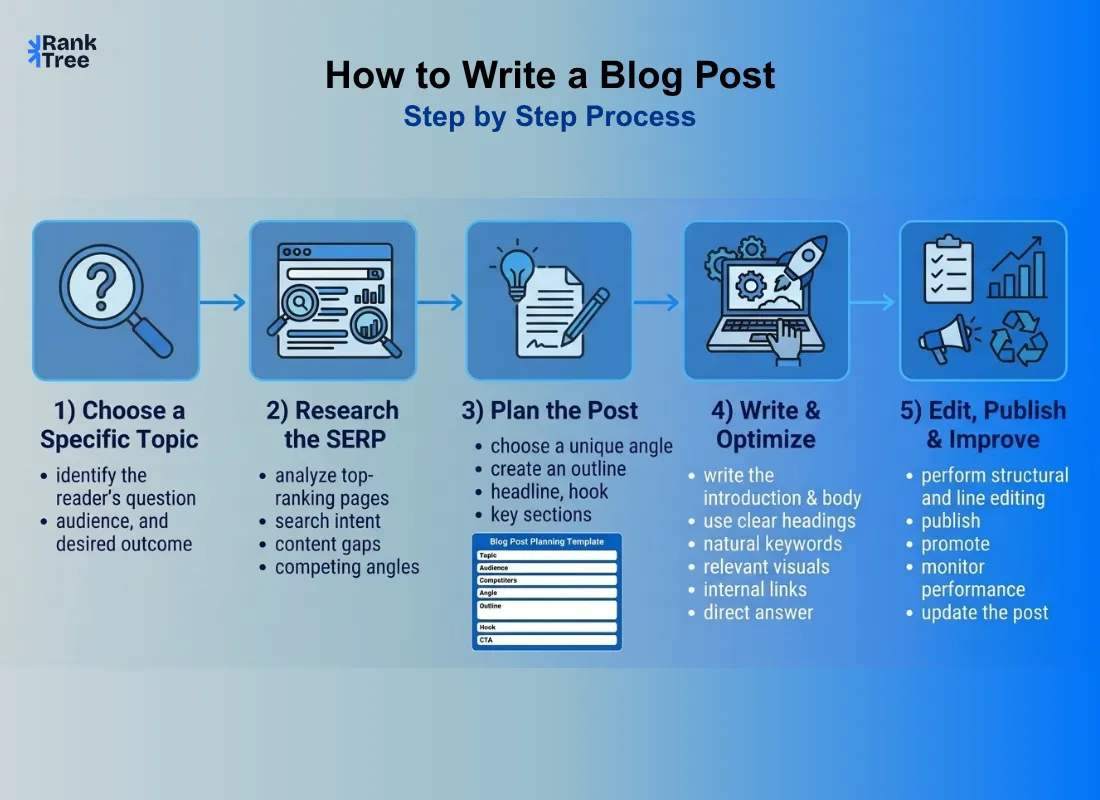
Most "how to write a blog" guides give you a handful of tips and stop there, write a good headline and be consistent using SEO. What they don't give you is the actual process: what happens before you open a blank document and what happens after you hit publish.
This guide covers both. You'll get a real step by step workflow, a copy paste template, a worked example and SEO guidance that reflects how search actually works today, not "repeat your keyword a few times" which hasn't worked in over a decade.
How do you write a blog post? Writing a strong blog post means picking one specific topic your audience is actively searching for researching what already ranks in the top 5 results and outlining your unique angle before drafting.
Write a specific headline under 60 characters, then open with a direct answer a relatable problem or a surprising fact rather than throat clearing, since readers decide whether to keep reading within the first two sentences.
Structure the body for scanning with descriptive subheadings, short 2-4 sentence paragraphs and bulleted lists, and add a self contained 2-3 sentence answer near the top so both readers and AI generated summaries can extract it cleanly.
Match search intent and cover related concepts naturally instead of repeating a keyword. Finally edit in two separate passes, structural first, then line level and promote the post through email, internal links and communities where its audience actually gathers.
Quick Answer: How to Write a Blog Post
Writing a strong blog post means picking one specific topic your audience is actively searching for, researching what's already ranking outlining your unique angle, writing a clear headline and hook structuring the body for scannability and editing before you publish and promote it.
Step 1: Pick One Topic Not a General Subject
"Marketing" is a subject. "How to write a subject line that doesn't get marked as spam" is a topic. The difference matters because a subject is impossible to cover fully in one post and readers land confused about what they'll actually get.
Before you write a single word answer:
What single question or problem does this post solve?
Who is asking it and what do they already know?
What should they be able to do after reading that they couldn't do before?
If you can't answer all three in one sentence each your topic is still too broad.
Step 2: Check What's Already Ranking (Before You Assume You Know)
This is the step almost every "how to blog" guide skips entirely and it's the one that determines whether your post has a real chance of getting found.
Search your topic in Google and look at the top 5 results:
What angle do they all take? If everyone covers the same 5 points that's the baseline not your ceiling.
What do they leave out? Missing examples, missing templates, missing recent data, these are your openings.
What format wins? Numbered list narrative guide comparison matches what the format of the top results signals about search intent then improves on it.
You're not copying competitors. You're finding out what the bar already is so you can clear it.
If you want to explore related topics and content opportunities in more depth, RankTree’s keyword research resources can help before you build your outline.
Step 3: Choose Your Angle and One Sentence Promise
Write down in one sentence what makes your post worth reading over the five you just looked at. This becomes your internal compass for every section you write next. Examples:
"Unlike other guides this one includes a full worked example not just a list of tips."
"This is the only guide that corrects the outdated keyword stuffing advice still floating around."
If you can't state your angle in one sentence readers won't be able to find it either.
Step 4: Outline Before You Draft
Skipping the outline is the single biggest reason writers stare at a blank page. A simple outline takes ten minutes and saves an hour of directionless drafting.
A working outline needs:
The headline (can change later but write one to anchor the piece)
The hook one line for how you'll open
3–6 main sections what each one proves or explains
The takeaway/CTA what you want the reader to do or think differently
Step 5: Write the Headline
A headline has one job: make the exact right reader stop scrolling. It should be specific, not clever for its own sake. "How to Write a Blog Post" beats "Blogging Secrets Nobody Tells You" specificity outperforms mystery almost every time because it matches what people are actually typing into search.
Keep it under 60 characters if it also needs to work as a page title, place the core phrase near the front and make a promise you can actually keep in the post.
Step 6: Nail the First Two Sentences
Readers (and search engines increasingly favoring content that answers the query immediately) decide whether to keep reading within the first two sentences. Open with one of these:
A direct answer to the exact question your headline asks
A specific relatable problem your reader is currently stuck on
A surprising fact or number that reframes the topic
What doesn't work: throat clearing. "In today's fast paced digital world blogging has become..." delete this kind of sentence on sight. It delays the value and gives readers a reason to leave.
Step 7: Structure the Body for Scanning Not Just Reading
Most readers scan before they commit to reading. Structure your post so scanning alone delivers value:
Descriptive subheadings a reader skimming only your H2s should understand the full shape of your argument
Short paragraphs 2–4 sentences; one idea per paragraph
Bulleted or numbered lists wherever you're presenting steps options or examples
Bold key phrases sparingly only where a skimmer needs the anchor
One idea per section if a section is doing two jobs split it
Step 8: Use Modern SEO Not Keyword Repetition
Older advice tells you to "use your keyword a few times." That's outdated and can actively hurt readability without helping rankings. Here's what actually matters in 2026:
Match search intent not just keyword text write the post the searcher actually needs not just one that contains the phrase.
Cover related concepts naturally a post about writing a blog should naturally touch on headlines structure editing and promotion because that's what comprehensive coverage of the topic looks like not because you're stuffing in synonyms.
Use the keyword where it's structurally expected title one H2 opening paragraph because that's where readers and search engines both expect topical confirmation not because repetition itself ranks pages.
Add a self contained answer near the top a 2–3 sentence direct answer to the core question so both readers and AI generated search summaries can extract your answer cleanly.
Link internally to 2–3 relevant pages on your own site with descriptive anchor text and externally to 1–2 credible sources.
Step 9: Add Visuals With Purpose Not Decoration
Every image should do a job: illustrate a step, break up a long section or show something words can't easily describe. When you add one:
Write alt text that describes what's actually in the image not just the keyword
Add a caption when the image needs context to make sense on its own
Credit sources if the image isn't yours
Step 10: Write the Ending Like It's Part of the Argument
A weak ending trails off. A strong one closes the loop you opened in the headline and tells the reader exactly what to do next. Leave a comment, try the template and read a related post. Don't leave the "so what" up to the reader to figure out.
Step 11: Edit in Two Separate Passes
Editing your own draft the moment you finish writing it rarely catches real problems because you're still too close to it. Split editing into two passes:
Structural pass (do this first): Does the order make sense? Is anything redundant? Does every section earn its place? Cut before you polish.
Line pass (do this second): Read it aloud. Cut filler words. Shorten sentences that make you run out of breath. Fix anything that doesn't sound like you.
Tools like Hemingway Editor (readability) and Grammarly (grammar/clarity) are useful here but neither replaces reading your own draft out loud; that's still the fastest way to catch awkward phrasing.
Step 12: Promote Beyond "Post It on Social Media"
Publishing isn't the finish line. A post with zero promotion plan usually gets zero traction regardless of quality.
Email your list if you have one this is usually your highest intent audience
Internal links link to the new post from 2–3 older relevant posts on your site
Repurpose turn key points into a short social thread or a single graphic
Share where the topic's audience actually gathers a relevant community or forum not just your own feed
Step 13: Check What Happened
Two weeks after publishing look at:
Where it ranks for your target topic (if SEO was a goal)
Average time on page a low number often means the opening didn't deliver on the headline's promise
Where readers drop off if there's a spot everyone leaves that section needs a rewrite
This data feeds directly into your next post it's the fastest way to get better without guessing.
A Full Worked Example
Here's how this process looks applied to a real topic: "how to write a subject line that doesn't get marked as spam."
Topic check: Specific problem (spam filters) specific audience (email marketers) clear outcome (subject lines that land in inbox).
Competitor gap found: Top results list "words to avoid" but none explain why filters flag them or give a testing process.
Angle: "This is the only guide that explains the filter logic not just a list of banned words."
Outline: Hook (a subject line that got flagged despite following every rule) → why keyword lists alone don't work → what filters actually score → a testing checklist → 5 before/after examples.
Self contained answer: "A spam safe subject line avoids ALL CAPS excessive punctuation and manipulative urgency language keeps to 6–10 words and is tested against a spam checker before sending."
That's the level of specificity that separates a post that ranks and gets read from one that technically exists.
Copy Paste Blog Post Planning Template
Field | Your Input |
Specific topic (one sentence) | |
Who is searching for this and why | |
Top 3 competing posts + what they miss | |
Your one sentence angle | |
Headline (draft) | |
Opening hook (one line) | |
3–6 main sections | |
Self contained answer (2–3 sentences) | |
Internal links to include | |
CTA / ending |
Blog Post Types and How Structure Changes?
Type | Best for | Structural difference |
How to | Teaching a process | Numbered steps one action per step |
Listicle | Scannable options/ideas | Consistent format per item no forced narrative |
Comparison | Helping a decision | Side by side criteria not sequential prose |
Opinion/analysis | Building authority | Clear thesis stated early evidence led sections |
Using the wrong shape for the topic is a common quiet reason posts underperform how to write as loose narrative forces readers to hunt for the actual steps.
Common Mistakes That Quietly Hurt Blog Posts
Stuffing your keyword in unnaturally it reads awkwardly and doesn't improve rankings; comprehensive intent matched coverage does.
Opening with throat clearing instead of the point.
Writing the outline in your head instead of on paper untracked ideas get repeated or dropped mid draft.
Skipping the structural edit and going straight to line editing you end up polishing sentences you'll delete anyway.
No promotion plan treating "publish" as the last step instead of the halfway point.
Start With the Template Not the Blank Page
The gap between bloggers who publish consistently and those who stall isn't talent, it's a process. Pull the template above into your own notes, fill it in before you draft and you'll spend your writing time on the sentences that matter instead of staring at a blinking cursor.
FAQs
How long should a blog post be?
Long enough to fully answer the topic you defined in Step 1 not a fixed number. A quick how-to might need 800 words; a comprehensive guide might need 2500. Match length to the depth the topic actually requires.
Is keyword repetition still good for SEO?
No. Repeating a keyword unnaturally can hurt readability without improving rankings. What matters is answering the searcher's actual question and covering the topic's related concepts naturally.
Should I write the headline first or last?
Write a working headline first to anchor your outline then revisit it after the draft is done. Your angle often sharpens once the post is written.
How do I know if my blog post is ready to publish?
Run it against the template above: does every field have a specific non generic answer? If yes and it's passed both editing rounds it's ready.
What is blog structure, and why does it matter?
Blog structure is the skeleton of a post — headline, intro, H2/H3 heading hierarchy, and conclusion — that determines whether a reader (and Google) can scan it and find what they need. It's the same thing this guide's step-by-step process builds toward: a clear blog post structure isn't a separate step from writing, it's the outcome of following the process above.
RankTree Team — The RankTree team writes about SEO strategy, keyword clustering, and topical authority to help you build content that ranks.