Content Pruning SEO: How to Remove Weak Pages Without Losing Traffic
By RankTree Team · 2026-10-29
Part of the SEO Content Brief: Template, Example and Scoring System guide →
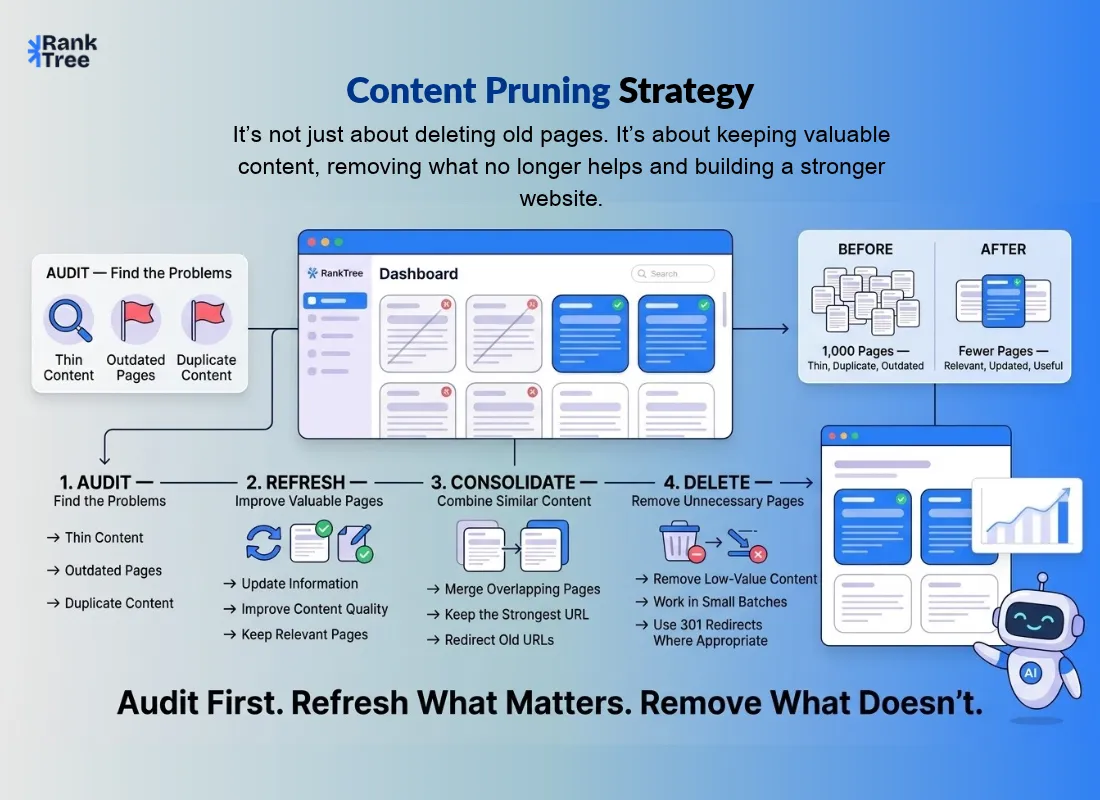
Deleting pages to grow traffic. Sounds like terrible advice, right?
And yet if your site has spent years piling up thin, outdated, or duplicate pages, cutting the dead weight is one of the few moves that genuinely lifts everything else.
Here's what content pruning actually is, when it helps, when it backfires, and the exact 5-step process to do it without losing rankings or backlinks.
What Is Content Pruning in SEO?
Here's the plain version: content pruning means removing, consolidating, or redirecting low-value pages so the pages worth keeping can perform better.
And no pruned doesn't always mean deleted. Sometimes the useful parts of a weak page move into a stronger one, and the old URL simply points there.
The idea feels backwards. Delete content, get more traffic? It does work. But only in the right situation, and that situation is a lot narrower than most guides will admit.
Why Pruning Works (When It Works)?
Three things explain the results. Each one fits a different kind of site.
1. Crawl budget
Google doesn't crawl your whole site with unlimited patience every site gets an allowance. On really big sites, low-value pages chew through that allowance before the important pages ever get visited.
Cut the dead weight and the pages that matter get crawled and indexed faster. HubSpot pulled more than 3,000 old blog posts and saw 20% fewer crawls and 38% fewer URLs crawled and new posts started showing up in the index within minutes instead of hours.
2. Sitewide quality signals
Google doesn't judge your pages one by one in isolation. It looks at the site as a whole. Its own guidance puts it bluntly: having relatively high amounts of unhelpful content might cause other content on the site to perform less well, and removing unhelpful content might contribute to your other pages performing better.
Belkins took out 400 low-quality pages — nearly two-thirds of the entire site and monthly organic visits climbed from about 3,000 to nearly 10,000.
3. Simpler navigation
Sometimes the win has nothing to do with traffic. IBM cut over 1,000 pages from its main navigation and traffic didn't move at all but the navigation's Net Promoter Score jumped 30% right away, and visitors rated the content itself higher too. Fewer dead ends, and suddenly the good stuff is easy to find.
When NOT to Prune?
Most guides skip this part. Honestly, it matters more than the process itself. Don't prune if:
Your site is small — a few hundred pages, each written for a real reason. Crawl budget isn't your problem here, and every page you delete just shrinks your footprint.
The page still earns something, even a little: traffic, backlinks, conversions. Prune the dead weight, not the quiet performers.
The content is seasonal. Dead in summer, busy every December? Check a full 12 months before you judge it.
You haven't checked backlinks yet. A page other sites link to is an asset even with zero traffic — redirect it, never hard-delete it.
If none of that applies and your site genuinely carries a lot of low-quality content, pruning is worth doing. Otherwise? Go refresh something instead.
How to Prune Content in 5 Steps?
Step 1: Audit every page
Pull every URL together with its traffic (last 12 months), keyword rankings, backlink count, and publish date. Google Search Console, Google Analytics, Screaming Frog, Ahrefs — pick your tools. Without this data, you're not pruning, you're guessing.
Step 2: Classify each page
Every URL goes into one of four buckets: Keep, Update, Merge, or Remove. The decision table below does the sorting for you.
Step 3: Work in the right order — refresh first, delete last
For each candidate, try these in order:
Refresh it if the keyword still matters and the content is just stale.
Consolidate it if two pages chase the same intent — fold the weaker one into the stronger and 301-redirect the old URL.
Delete it only if there's genuinely nothing worth saving.
Step 4: Delete in small batches
Take out one section or subfolder at a time — Belkins did one subfolder a week — then watch what happens for a week or two before the next batch. If traffic drops out of nowhere, a small batch is easy to roll back. A sitewide purge isn't.
Step 5: Redirect, then measure
Any deleted page with backlinks or traffic gets a 301 redirect to the closest matching page — similar topic, not the homepage. And if no related page exists, a 410 status (permanently gone) beats a redirect to nowhere. Then, for 2–4 weeks, track three things: what share of your important pages are indexed (and how fast), whether search traffic to the pages you kept went up, and whether the site got easier to move around. One more thing — pruning works best as one step inside a wider content strategy, not as a one-off cleanup.
Pruning Decision Table
Page signal | Action |
Zero organic traffic for 6+ months, no backlinks, no conversions | Delete (301 to the closest match, or 410 if none exists) |
Two pages targeting the same keyword or intent | Merge into the stronger page, 301 the weaker URL |
Outdated facts but the topic still matters | Update with fresh data, examples, and keywords |
Thin content (under 200–300 words) with little value | Expand it, or merge it into a related page |
Seasonal page, quiet right now | Keep — check a full 12 months first |
Page with backlinks but no traffic | Redirect, never hard-delete |
What Pruning Has Actually Delivered?
Site | What they removed | Result (as reported) |
Vehicle valuation platform (via Ahrefs) | ~4,860,000 programmatic pages → 1,500 | Organic visits +160%, conversions +105% within weeks |
Belkins (via Ahrefs) | 400 low-quality pages, ~two-thirds of the site | ~3,000 → ~10,000 organic visits per month |
HubSpot (via Ahrefs) | 3,000+ old blog posts | 20% fewer crawls, 38% fewer URLs crawled, new posts indexed in minutes |
CNET (via BuzzSumo) | ~3,000 outdated/thin articles | Organic traffic up ~29% |
Seer Interactive (via ziptie) | 14,000 low-value/duplicate pages | Organic traffic +23% year over year |
Two honest caveats before you get excited. One: the biggest wins come from the biggest sites a 5-million-page cleanup tells you almost nothing about what a 200-page blog will see.
Two: pruning almost always runs next to other improvements, so pinning down its exact share of the result is hard. Read these as what's possible, not what's promised.
Common Content Pruning Mistakes
Deleting before checking backlinks. A single linked page deleted without a redirect can cost you more than ten thin pages ever did.
Redirecting everything to the homepage. A redirect should land somewhere on a similar topic. Homepage redirects confuse visitors and throw away the old page's relevance.
Pruning in one giant batch. Something breaks and you'll have no idea which deletion did it.
Setting a deletion quota. "Delete 30% of pages" is a made-up target. Let the data decide, page by page.
Forgetting internal links. A deleted page might be linked from ten of your own articles. Fix those links, or you create orphans.
Final Words
Here's the thing to remember: content pruning is maintenance, not magic. It won't save a site with nothing worth ranking, and it won't fix pages that only needed a refresh.
But if your site has spent years collecting thin, outdated, or duplicate pages, clearing out the dead weight is what finally lets the good pages get crawled, trusted, and found.
Audit first. Refresh what still matters. Consolidate what overlaps. Delete only what's left in small batches, with redirects in place. Fewer pages, honestly kept, will always beat a thousand pages nobody needs.
FAQs
What is content pruning in SEO?
It's the process of removing, consolidating, or redirecting low-value pages — no traffic, no backlinks, no relevance — so search engines spend their crawl budget and ranking trust on your best pages instead.
Does deleting content hurt SEO?
Not when it's done carefully: redirects for linked pages, small batches, no surprises. What hurts is deleting pages that earn traffic or backlinks and just letting them 404.
How often should you prune content?
Audit at least once a year. Bigger sites do better with a rolling review every six months. Either way, prune in small batches with a week or two of monitoring in between — not one giant annual purge.
What is the difference between content pruning and a content audit?
A content audit is the review itself — it finds what's weak, missing, or duplicated. Pruning is just one outcome of that audit: the removal or consolidation step. The audit also hands you updates and new content ideas, which pruning alone never will.
Should small websites prune content?
Usually not. Small sites rarely run into crawl-budget trouble, and each page you delete makes your footprint smaller. Refresh what's outdated and consolidate true duplicates instead of running a pruning program.