Orphan Pages: What They Are and How to Find & Fix Them
By RankTree Team · 2026-10-09 · Updated 2026-10-10
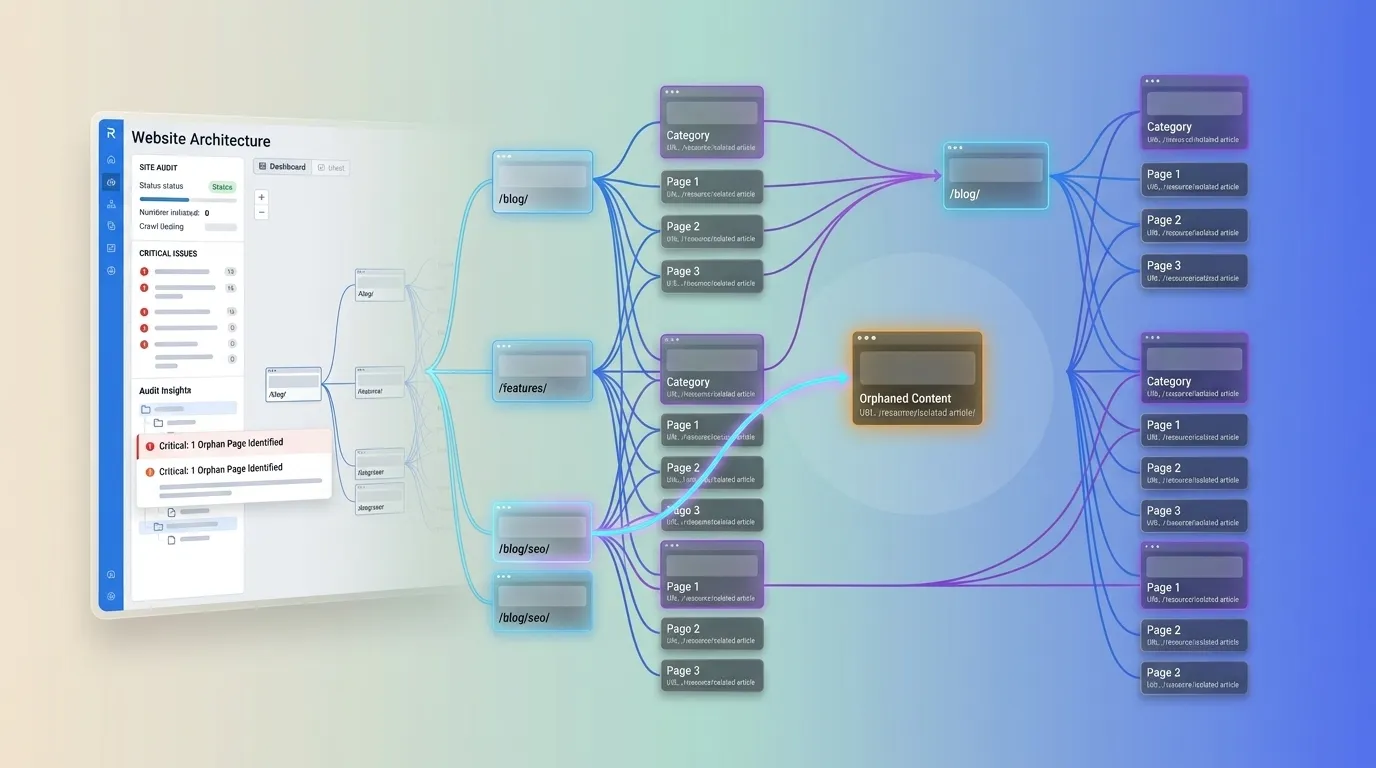
Orphan pages are live pages on your website that have zero internal links pointing to them. No other page on your site links to them so visitors can't reach them by browsing and search engines struggle to discover crawl and rank them.
They exist but structurally they're invisible. If you've ever published a page watched it sit in your sitemap for months and wondered why it never ranks there's a good chance it's an orphan.
In this guide you'll learn exactly what orphan pages are why they silently kill your SEO performance five proven methods to find every orphan on your site and a step by step process to fix them plus a system to make sure they never come back.
What Is an Orphan Page in SEO?
An orphan page is any page on your website that receives no inbound internal links meaning no other page on the same domain links to it.
Think of your website as a city and internal links as roads. Every important building (page) should have roads leading to it.
An orphan page is a building with no roads. It exists on the map (your XML sitemap) but nobody can drive to it and delivery trucks (search engine crawlers) rarely bother visiting.
Here's what makes a page an orphan and what doesn't:
Orphan: a blog post from 2023 that was linked from the homepage for a week then pushed off as newer posts arrived. Today nothing links to it.
Not an orphan: a page linked only from your XML sitemap. Technically reachable by Google but it still gets zero internal link equity most SEOs treat "sitemap only" pages as orphans too because a sitemap doesn't pass authority or context.
Not an orphan: a page with only external backlinks but no internal links. It's discoverable but it's still structurally disconnected from your site fix it the same way.
The key test is simple: can a crawler reach this page by following internal links from your homepage? If not it's orphaned.
Why Orphan Pages Hurt Your SEO?
Orphan pages can harm SEO in four ways:
1. Google May Struggle to Discover Them
Googlebot discovers pages mainly through links. Without internal links, orphan pages rely on sources like XML sitemaps, which don't guarantee crawling. As a result, these pages may be crawled less often.
2. They Receive No Internal Link Equity
Internal links pass PageRank between pages. Orphan pages receive no internal link equity, making it harder for them to build authority and rank.
3. They May Remain Unindexed
Orphan pages may appear as "Discovered — currently not indexed" in Google Search Console. Adding relevant internal links can improve discoverability, but indexing isn't guaranteed.
4. They Can Waste Crawl Resources at Scale
A few orphan pages rarely cause major problems. However, large numbers of low-value orphan URLs can waste crawl resources and indicate poor site architecture, especially on large websites.
Bottom line: the page itself suffers most it can't rank without links pointing to it. But at scale orphans drag down the entire site's crawl efficiency.
Orphan Pages vs. Dead End Pages vs. Thin Content
These terms get mixed up constantly. Here's the difference:
Concept | Definition | The problem |
Orphan page | No internal links pointing to it | Can't be discovered or build authority |
Dead end page | No internal links going out from it | Traps link equity; poor UX (though less of an SEO issue than it used to be) |
Thin content | Low value or shallow content | Can be perfectly well linked and still not rank |
An orphan page can contain outstanding in depth content the problem is purely structural. Thin content is a quality problem. Don't confuse the two because the fixes are completely different: thin content gets expanded merged or pruned; orphaned content gets relinked into your site architecture.
What Causes Orphan Pages?
Orphan pages rarely appear intentionally. They accumulate through normal site operations:
Site redesigns and migrations. Old URLs get redirected or dropped from navigation and some pages fall through the cracks.
Blog publishing without a linking workflow. A post is published linked from the homepage for a few days then buried as newer content arrives. This is the #1 cause blog posts are the most common orphan pages on content heavy sites.
Faceted navigation and filtered pages. Ecommerce filters generate URLs that exist in the sitemap but are never linked from category structure.
Pagination and archives. Old paginated archive pages lose their links when pagination structure changes.
Deleted parent categories. When a category or hub page is removed its child pages can be left floating with no parent linking to them.
Test staging and campaign pages. Landing pages built for a campaign stay live after the campaign ends linked from nothing.
If any of these sound familiar you almost certainly have orphans. Time to find them.
How to Find Orphan Pages: 5 Proven Methods?
The core logic is always the same: compare the list of URLs you know exist against the list of URLs your internal link graph can reach. The difference is your orphan list.
Orphans = All known URLs − URLs reachable via internal links
Method 1: Site crawl + sitemap comparison (most reliable)
This is the gold standard.
Crawl your site with Screaming Frog (free up to 500 URLs) or Sitebulb in standard spider mode following internal links only.
Export the full list of crawled URLs.
Pull your complete URL list from three sources: your XML sitemap a CMS export and Google Search Console's indexed pages.
Any URL that appears in your known URL list but not in the crawl is unreachable via internal links that's an orphan.
Screaming Frog can do part of this automatically: connect your sitemap and GSC/GA4 as URL sources then check the "Orphan URLs" logic by comparing crawl coverage against those sources.
Method 2: Google Search Console Pages report (free practical)
Open GSC → Pages (under Indexing).
Look at URLs under "Discovered currently not indexed" and "Crawled currently not indexed."
Cross check each URL: is it linked from your main navigation a hub page or at least one strong content page?
URLs in these buckets with no real internal links are usually orphans and the fix is better placement not more content.
This method is especially useful because it surfaces the orphans Google already cares about.
Method 3: Ahrefs Site Audit
Ahrefs' Site Audit has a dedicated "Orphan page (has no incoming internal links)" report. Run a crawl open the report and you get the full list with each page's organic traffic and backlink data attached which makes prioritization (covered below) much faster.
Method 4: Semrush Site Audit
Semrush similarly flags orphaned pages under its crawlability issues. Like Ahrefs it pairs the orphan list with traffic data so you can sort by impact.
Method 5: The 10 minute manual audit (no tools)
Pick 10 URLs you care about money pages top posts key landing pages. For each one answer three questions:
Can I reach it from the homepage in 3 clicks or fewer?
Does it have at least 2 internal links from strong pages (homepage a hub page a top performing post)?
Does it link back to its cluster (pillar or hub page)?
If you answer "no" twice for any URL treat it as an orphan and fix it.
Method comparison
Method | Cost | Best for | Catches |
Crawl + sitemap compare | Free–paid | Full accuracy | All orphans including sitemap only pages |
GSC Pages report | Free | Prioritizing what Google sees | Orphans stuck in discovery/indexing |
Ahrefs Site Audit | Paid | Large sites + prioritization | Orphans with traffic/backlink data |
Semrush Site Audit | Paid | Large sites + prioritization | Orphans with traffic data |
10 minute manual audit | Free | Small sites quick wins | Obvious orphans on key pages |
How to Fix Orphan Pages: A Step by Step Process?
Finding orphans is the easy part. Fixing them strategically is what moves rankings.
Step 1: Build your orphan list and prioritize
Not all orphans deserve equal effort. Score each orphan on two axes:
Traffic/revenue potential: does the page target a keyword with real search demand? Does it support a money page?
Fix effort: how easily can you add relevant links to it?
Fix high potential low effort orphans first. A comprehensive guide that took weeks to write and targets a 2000 searches/month keyword is priority #1. A 2019 announcement post with no search demand can wait or be pruned (see Step 5).
Step 2: Give every important orphan a job inside a cluster
The highest leverage fix is structural: plug the orphan into your topic cluster.
Link to the orphan from the relevant pillar or hub page this is the single most powerful link you can add.
Link to it from at least one strong page (a high traffic post or a page with real backlinks).
Add a "related articles" or "next steps" block on the orphan that links back to the pillar and sibling pages so equity flows both ways.
One or two well placed contextual links from relevant authoritative pages will often move an orphan's rankings within weeks. This is also exactly what a topical map is designed to prevent: when every page has a defined place in the cluster before it's published orphans never happen.
Step 3: Add contextual internal links with descriptive anchors
Don't just drop the orphan into a footer link farm. Add contextual links inside the body content of relevant pages using anchor text that describes what the orphan page is about. Contextual links pass more relevance signals than navigation links and descriptive anchors help Google understand the orphan's topic.
Aim for 2–5 relevant inbound links per important orphan.
Step 4: Use navigation hubs and related post blocks for scale
If you have dozens of orphans in one section (common with blog archives) fix the system not each page:
Add the section to main navigation or a hub page.
Add automated "related posts" blocks that link between topically similar articles.
Make sure new posts automatically link to 2–3 older relevant posts as part of your publishing checklist.
Step 5: Know when NOT to link prune instead
Some orphans shouldn't be saved. If an orphan page has no traffic potential no backlinks and no business value don't waste links on it:
Noindex it if it must stay live (thank you pages old campaign pages).
301 redirect it to the most relevant live page if it has backlinks worth preserving.
Delete it (410/404) if it's truly useless and remove it from the sitemap.
Pruning junk orphans concentrates your crawl budget and link equity on pages that matter.
Step 6: Verify the fix
After adding links:
Re crawl the site and confirm the page now shows inbound internal links.
In GSC use URL Inspection → Request Indexing on the fixed page.
Monitor the Pages report over the next 2–4 weeks watch "Discovered/Crawled not indexed" counts drop and impressions climb.
How to Prevent Orphan Pages for Good?
Prevent orphan pages by building internal linking into your publishing process:
Plan before publishing: Assign each page to a relevant pillar and identify existing pages that should link to it. Use a topical map to plan your content structure.
Create a linking checklist: Ensure every new page has relevant internal links to existing content and at least one planned inbound link.
Audit quarterly: Compare site crawls with your sitemap to identify orphan pages.
Check after site changes: Audit internal links after redesigns, navigation updates, or category deletions.
Use keyword clustering: Group keywords into pillar, sub-pillar, and supporting clusters with RankTree's keyword clustering tool to build a connected content structure.
Planning content in clusters helps establish a clear internal linking structure before publishing, reducing the risk of orphan pages.
Conclusion
Orphan pages are one of the highest ROI fixes in technical SEO: the content already exists the site already has authority the only thing missing is the connection between them. Find your orphans with a crawl vs sitemap comparison prioritized by traffic potential plug each important page into its topic cluster with contextual links prune what isn't worth saving and verify in Search Console.
Better yet stop creating orphans in the first place. Plan your content as connected clusters not isolated posts and every page is born with a place in your site's architecture.
Want to see exactly where each page belongs before you publish? Generate a free topical map from your keyword list and turn disconnected pages into a structured interlinked content hub.
FAQs
What Is an Orphan Page in SEO?
An orphan page is a live webpage with no inbound internal links. Visitors cannot find it through site navigation, and search engines may struggle to discover and rank it.
How Do I Find Orphan Pages on My Site?
Compare a site crawl using Screaming Frog or Sitebulb with your XML sitemap and Google Search Console URLs. Pages missing from the crawl may be orphaned. Ahrefs and Semrush can also help identify them.
Are Orphan Pages the Same as 404 Pages?
No. A 404 page is unavailable at the requested URL, while an orphan page is live but has no inbound internal links. You can often fix an orphan by adding relevant links.
Do Orphan Pages Hurt My Whole Site's SEO or Just That Page?
The main impact is usually on the orphan page itself. However, many low-value orphan URLs can create crawl inefficiencies and indicate problems with site architecture, especially on large websites.
Will Fixing Orphan Pages Improve My Rankings?
Adding relevant internal links can improve discoverability and may help indexing and rankings. However, results depend on factors such as content quality, competition, and Google's indexing decisions.