Competitor Topical Map: How to Get One and Find the Gaps
By RankTree Team · 2026-11-10 · Updated 2026-11-10
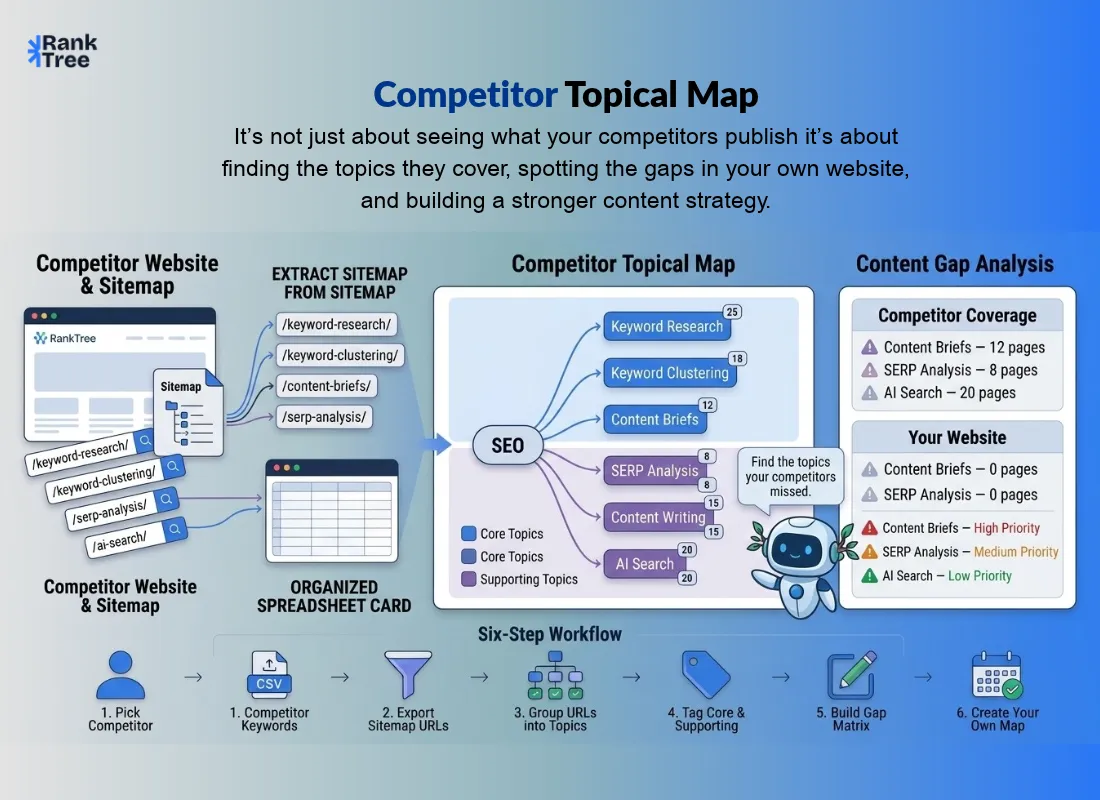
You can get a competitor's topical map in under an hour, free, from their sitemap. You do not need a paid tool. You read their sitemap, group their URLs into topics, and mark each topic as core or supporting.
The result shows what your rival covers, where its coverage is thin, and which topics it owns that you do not. That is what searchers mean when they type "get topical map of competitor seo".
This guide shows the free method in six steps. It also shows when a paid tool or an AI shortcut helps, and how to check your work at the end.
A topical map is a plan of every page a site needs to cover one subject. A competitor topical map is the same plan, drawn for a rival. It tells you where the rival is strong and where it left gaps. You use it to decide what to write next, not to copy what the rival wrote.
What Is a Competitor Topical Map?
A competitor topical map is a map of the topics a rival website covers, built from its own pages. You read its sitemap, group its URLs into topics, and mark each topic as core or supporting.
The result shows what the rival treats as important, where its coverage is thin, and which topics it owns that you do not.
It differs from your own topical map in one way. Your map plans what you will write. A rival's map records what someone else already wrote. You read it to find gaps, not to repeat their work.
It is not a keyword list. Keywords tell you which terms a rival ranks for. A topical map tells you which subjects the rival covers, and how deep the coverage goes.
This article maps topics, not keywords. If you want the keyword list behind the map, see how to find your competitor's keywords.
What You Need Before You Start?
Gather these four things. The whole job takes 30 to 60 minutes for one rival.
One rival domain. Pick a site that ranks for your target topics, not just a business rival.
The rival's sitemap address. It is usually at rivaldomain.com/sitemap.xml.
A spreadsheet. Google Sheets or Excel both work.
A crawler or an LLM account, only if the URL list is long. A browser and a spreadsheet are enough for a small site.
The 6 Steps at a Glance
Step | Action | What you get |
1 | Pick the right competitor | One rival domain with a public sitemap |
2 | Open the sitemap and export every URL | A full URL list in a spreadsheet |
3 | Group the URLs into topics | 5 to 10 topic groups with short labels |
4 | Tag each topic core or outer | A map that shows what the rival treats as central |
5 | Build the gap matrix | A short list of topics the rival covers and you do not |
6 | Turn the gaps into your own map | New clusters added to your map, ready to write from |
Step 1: Pick the Right Competitor
List three to five sites that rank for your target topics. Search your main topics on Google and note who holds the top spots. Then pick the one with the clearest topic structure. A blog with clear categories beats a messy site with no structure.
Expected result: one rival domain with a public sitemap and a blog you can read.
Common mistake: picking a business rival who barely ranks. A firm you compete with for sales may not compete with you on Google. Fix it by picking an SEO rival, the site that actually ranks for the topics you want to own.
Step 2: Open the Sitemap and Export Every URL
Open rivaldomain.com/sitemap.xml in your browser. If that address shows an index file, open each part it lists. Copy every URL into your spreadsheet, one per row. Keep the full URL. You need the folders later.
Expected result: a full list of the rival's URLs, often 50 to 500 rows for a blog.
Common mistake: copying only the blog index page and missing half the site. Navigation shows a few dozen links.
A sitemap shows them all. Fix it by working from the sitemap, not from the menus. If the list looks short, open the sitemap index and check for more parts.
Step 3: Group the URLs Into Topics
Sort the URLs by folder first. Folders such as /blog/seo/ often match topics. Then read the titles and H1s to confirm each group. If the list is long, use a crawler such as Screaming Frog to pull titles and H1s in one pass.
Group by entity, the single thing each topic is about, such as "keyword research" or "content briefs".
Expected result: 5 to 10 topic groups, each with a short label and a URL count.
Common mistake: grouping by URL words alone. Two URLs can share a folder and cover different topics. Fix it by reading the titles. A title tells you the topic. A folder only hints at it.
Step 4: Tag Each Topic Core or Outer
Mark each group core or outer. Core groups carry the main subject. They hold the pages that teach it or sell it. Outer groups support it. They hold answers, examples, tools and FAQs. A site has two or three core subjects at most. The rest is outer.
Expected result: every group has a tag, and you can see which subjects the rival treats as central.
Common mistake: tagging every group as core. If all groups are core, the tags mean nothing. Fix it by asking one question per group: does this group teach or sell the main subject or does it support it? Core topics are where the rival's topical authority is strongest, so mark them with care.
Step 5: Build the Gap Matrix
Make a table with one row per topic. Use these columns: topic, rival coverage, your coverage, gap, priority. Fill the rival column from your groups. Fill your column from your own sitemap.
Mark a gap where the rival covers a topic and you do not, or where their coverage is far deeper than yours.
Expected result: a short list of topics the rival covers and you do not, ranked by priority.
Column | What goes in it |
Topic | The group label from Step 3 |
Rival coverage | Core or outer, plus the page count |
Your coverage | Core, outer, or none, plus your page count |
Gap | Yes, no, or partial |
Priority | High, medium, or low, by fit and effort |
Common mistake: treating every gap as a must-write. A gap is only a chance if it fits your subject and serves your reader.
Fix it by scoring each gap on fit first. Write the high-fit gaps first and park the rest. This matrix is a topical version of a content gap analysis. The unit here is a topic, not a single page.
Step 6: Turn the Gaps Into Your Own Map
Take the high-priority gaps and turn each one into a short keyword list. Then group the gap keywords into clusters so each gap becomes one cluster with one intent.
After that, generate your own map from the keyword list with RankTree's free tool. If you have not built your own map yet, start with our guide on how to build a topical map. It shows the full build in seven steps.
Expected result: a map of your own with the gaps added as new clusters, ready to write from.
Common mistake: copying the rival's map as your own. Their map fits their subject, their reader, and their pages. Yours must fit you.
Fix it by using their map as a list of gaps only. Build your map around your subject, your reader, and your pages. Your map will differ from theirs, and it should.
A Worked Example
Illustrative example. The site and the numbers are made up to show the method. They are not real data.
Say your rival is a keyword tool blog with 120 URLs. You group them into six topics:
Topic | URLs | Tag |
Keyword research | 30 | Core |
Keyword clustering | 22 | Core |
Content briefs | 12 | Core |
SERP analysis | 8 | Outer |
Content writing | 28 | Outer |
AI search | 20 | Outer |
Your own site covers keyword research, keyword clustering, and content writing. Your gap matrix then looks like this:
Topic | Rival | You | Gap | Priority |
Content briefs | Core, 12 pages | None | Yes | High |
SERP analysis | Outer, 8 pages | None | Yes | Medium |
AI search | Outer, 20 pages | None | Yes | Low, weak fit for your subject |
The read is simple. "Content briefs" is the bigger gap, a core topic for the rival with zero pages on your site, so it becomes your next cluster. "SERP analysis" goes on the later list. "AI search" stays parked because it fits your subject weakly.
Shortcuts: Tools and AI
The free method gives you the same map as the paid tools. It just takes longer. Use a shortcut when you repeat this often.
Paid tools: Surfer's Topical Map compares a rival's topical coverage in one view, per Surfer's own docs. Ahrefs and Semrush show which rival pages earn traffic, per TrueSEO's guide. These tools save time. They do not change the method. No prices are listed here, because prices change and this guide does not track them.
AI shortcut: paste the rival's sitemap titles into an LLM such as ChatGPT, Claude, or Gemini, and ask it to group them into topics and find gaps. This works fast. Check every group the LLM returns against the real titles before you trust the map. An LLM can invent topics the rival never covered. Verify by hand.
How to Check It Worked?
Run through this list when you finish. If all four are true, the job is done.
You have a gap list with a decision for each row: write, later, or ignore.
Every gap maps to a cluster in your own map, or has a clear reason it does not.
Your map has at least one new cluster that came from the rival's map.
You have a date to repeat it. Do it again in three months, or sooner if the rival ships a new cluster.
Final Words
A rival's map is a shortcut to your next cluster. Get the sitemap, group the topics, build the gap matrix, and write the gaps that fit your subject. Start with the free method. When the gap list is ready, generate your own map from the keyword list with RankTree's free tool.
FAQs
Can I get a competitor's topical map for free?
Yes. A rival's sitemap is public, and a spreadsheet costs nothing. Open the sitemap, export the URLs, group them into topics, and tag each group core or outer. A crawler speeds up the title step. You only pay if you want a tool to do the grouping for you.
Do I need a paid tool to see a competitor's topical map?
No. The free method gives you the same map: sitemap, groups, core and outer tags, and a gap matrix. Paid tools save time. Surfer's Topical Map compares rival coverage in one view, and Ahrefs and Semrush show which rival pages earn traffic. Use them when you repeat this often, not for a one-off check.
Is it OK to copy a competitor's topical map?
You can read a public sitemap and learn from it. A sitemap is a public file, and reading it is normal SEO work. You must not copy their text, their pages, or their exact structure as your own. Use their map as a list of gaps, then build your map around your subject and your reader. Your map should look different from theirs.