Topical Map Template: Free Sheet to Plan Your Pages
By RankTree Team · 2026-11-12 · Updated 2026-11-12
Part of the Competitor Topical Map: How to Get One and Find the Gaps guide →
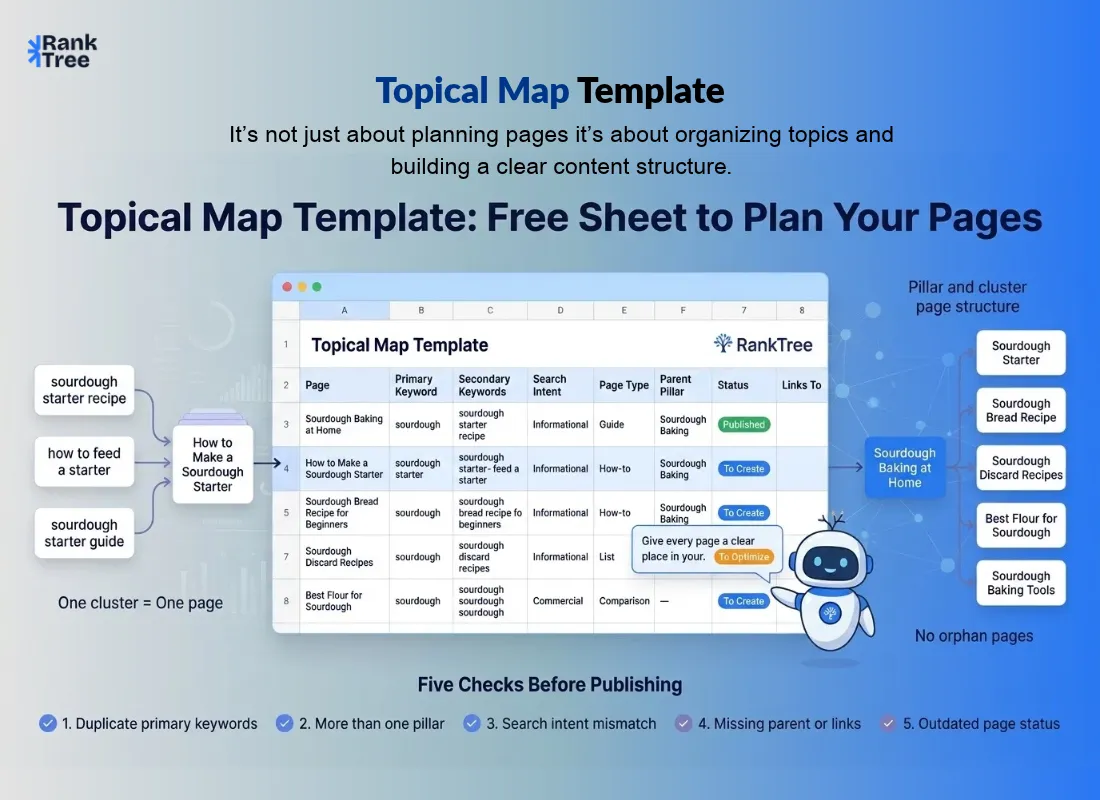
A topical map template is a spreadsheet that lists every page one topic needs, with one row per page. Each row records the page, its primary keyword, search intent, page type, parent pillar, status and links.
Copy the eight columns below, fill one row per page, and the sheet becomes the plan your whole topic follows.
This article gives you that sheet. You get the eight columns and a filled example from a small sourdough site. You also get five steps to fill it and five checks that catch mistakes.
If you have not built a map yet, read how to build a topical map first. The pillar shows the full build in seven steps.
One map covers one topic. If you run three services, make three maps. Each map stays small enough to finish.
What Is a Topical Map Template?
A topical map template is a ready-made spreadsheet layout for a topical map. It has one row per page. Its columns record the page, the primary keyword, and the intent. They also record the page type, the parent pillar, the status, and the links.
You fill it in once. It becomes the single document that says which page should rank for which keyword. It also shows what you have not written yet.
It is not a keyword list. A list only records what people search for. A template records a decision: this page owns this keyword, with this intent, and this status.
It is not a content calendar either. A calendar sets dates. A template sets pages, owners, and links. Use the calendar after the template, to set the order.
It also differs from a keyword mapping template. That sheet maps keywords to URLs. This sheet plans pages and links. Use the keyword mapping template inside each row when a page needs keyword detail. Keyword mapping assigns each cluster to one URL. The topical map template plans the pages those URLs belong to.
The Template: Eight Columns You Need
Build the sheet with these eight columns. Copy the header row below, then paste it into your sheet. Use one row per page.
Page, Primary keyword, Secondary keywords, Search intent, Page type, Parent pillar, Status, Links to
Column | What you put in it |
Page | The page title or working URL |
Primary keyword | The exact search term the page should rank for |
Secondary keywords | Two or three close variations that share the intent |
Search intent | Informational, commercial, transactional, or navigational |
Page type | Guide, comparison, how-to, list, or product page |
Parent pillar | The pillar page this page links up to |
Status | To Create, To Optimize, or Published |
Links to | The pillar plus one or two sibling pages |
Each column earns its place. Intent and page type catch mismatches. Status stops the map going stale. Links to stops a page with no parent. Secondary keywords stop a page collecting three main keywords.
Start lean if the topic is small. Use five columns first: Page, Primary keyword, Search intent, Status, Links to. Add the other three when the map grows past ten pages.
Volume and difficulty are optional add-ons. Take them from your keyword tool if you want a build order. The template works without them.
A Filled Example: A Small Sourdough Map
Here is the template filled in for a small site about sourdough baking at home. It has one pillar and five cluster pages. No volume or difficulty figures appear here on purpose. Add them from your own tool if you want them.
Page | Primary keyword | Secondary keywords | Search intent | Page type | Parent pillar | Status | Links to |
Pillar: Sourdough Baking at Home: The Complete Guide | sourdough baking at home | sourdough starter guide, home baking basics | Informational | Guide | Itself | Published | All cluster pages |
Cluster: How to Make a Sourdough Starter | how to make a sourdough starter | sourdough starter recipe, starter feeding schedule | Informational | How-to | Sourdough Baking at Home | To Create | Pillar; Sourdough discard recipes |
Cluster: Sourdough Bread Recipe for Beginners | sourdough bread recipe | easy sourdough loaf, first sourdough bake | Informational | How-to | Sourdough Baking at Home | To Create | Pillar; Sourdough starter |
Cluster: Sourdough Discard Recipes | sourdough discard recipes | discard pancakes, discard crackers | Informational | List | Sourdough Baking at Home | To Optimize | Pillar; Sourdough bread recipe |
Cluster: Best Flour for Sourdough | best flour for sourdough | bread flour vs all-purpose, whole wheat sourdough | Commercial | Comparison | Sourdough Baking at Home | To Create | Pillar; Best flour for sourdough |
Cluster: Sourdough Baking Tools | sourdough baking tools | dutch oven for sourdough, banneton basket | Commercial | List | Sourdough Baking at Home | To Create | Pillar; Best flour for sourdough |
Three decisions jump out.
First, the starter page is a how-to, not a guide. Its searcher wants steps, not an overview. The page type matches the intent.
Second, the discard page is To Optimize, not To Create. The page exists but does not match its keywords yet. That is a job for the next update round.
Third, every cluster page links up to the pillar and across to one sibling. No page stands alone. That is what makes it a map, not a list.
The niche is small on purpose. Six pages cover sourdough baking at home. A bigger topic needs more rows, but the columns stay the same.
How to Fill the Template in 5 Steps?
Start from your clusters, not from a keyword list
Group your keywords first. Then paste one cluster at a time into the template. One cluster becomes one row. If you want gaps first, get a competitor's topical map and turn its gaps into rows.
Give every row one primary keyword
The primary keyword shapes the title and the H1. Everything else on that row is secondary. Two primaries on one row means split the row or demote one.
Label intent and page type together
Read the keyword and decide what the searcher wants. To learn, to compare, to buy, or to reach a site. Then ask whether the page type fits. A transactional keyword on a guide is the most common mismatch. This step catches it.
Set the parent and the links
Every row names its parent pillar. Every cluster row also names one or two siblings. A row with no links is a page nobody will find. Write the links into the plan now, not after you publish.
Set the status and review it
Published means the page is live and mapped. To Optimize means the page exists but does not match its keywords. To Create means the page is planned. Review the sheet once a quarter, and update it the same day you publish, merge, or delete a page.
5 Checks That Catch Mistakes Before You Publish
You do not need formulas to check the map. Run these five checks by eye. Do it before the map becomes your content plan.
Check | What to look for | Fix |
Duplicate primary | The same primary keyword on two rows | Keep one row. Delete or reassign the other. |
Two pillars | Two rows marked as the pillar | Pick one pillar per map. Demote the other to a cluster. |
Intent mismatch | A transactional keyword on a guide, or an informational keyword on a product page | Move the row to a page whose type fits its intent. |
Orphan row | A row with no parent and no links | Add the parent and one sibling link, or delete the row. |
Stale status | A row still marked To Create months after the page went live | Update the status and the date on every row you touch. |
The first check matters most. A duplicate primary in the sheet is cannibalization planned in advance. Fix it in the sheet and it costs a minute. Fix it after publishing and it costs a redirect and weeks of split rankings.
Common Topical Map Template Mistakes
Mapping one keyword per page. Modern pages rank for dozens of related terms. Map one page per row, with secondaries inside it.
Starting too broad. A map for "baking" never ends. Pick a topic you can cover in 6 to 15 pages.
Mapping only by volume. High-volume keywords are hard for a young site. Map the specific questions first.
Forgetting the links. A map without links is a list of posts. Write the links into the plan.
Filling the sheet once and forgetting it. Search results and your own pages change. Review the map once a quarter.
Build Your Map Faster with RankTree
Filling the template by hand works. The slow part is the step before it: grouping hundreds of keywords into clusters with the same intent. A tool that groups your keywords into intent-based clusters does that part for you.
Upload your keyword list, and paste the clusters into the template above. The map is half built before you start assigning pages.
Once the rows are set, generate your own map from the keyword list with RankTree's free tool. The template itself stays a spreadsheet. Tools change. The map is the record of your decisions.
Final Words
A topical map template does one thing. It writes down, in a single place, which page owns which keyword. Eight columns, five checks, one review a quarter.
That is the whole system. Copy the template, fill it with one cluster, and run the five checks. It sits beside the pillar it serves, and the pillar shows the full build.
FAQs
What is a topical map template?
A topical map template is a spreadsheet that plans every page for a topic. It includes the primary keyword, search intent, page type, parent pillar, status, and internal links.
How many pages should a topical map have?
A focused topical map usually has 6–15 pages, including one pillar and supporting pages. Start small and add pages only when needed.
Do I need a paid tool to make a topical map?
No. A spreadsheet and a free keyword tool are enough. Paid tools can speed up keyword clustering and provide difficulty scores.
How often should I update a topical map?
Review your map quarterly and update it whenever you publish, merge, or delete an important page. Also check it after major content updates.