Topical Map SEO: What It Is, How to Build One, and the Tools That Do It
By RankTree Team · 2026-11-05 · Updated 2026-11-05
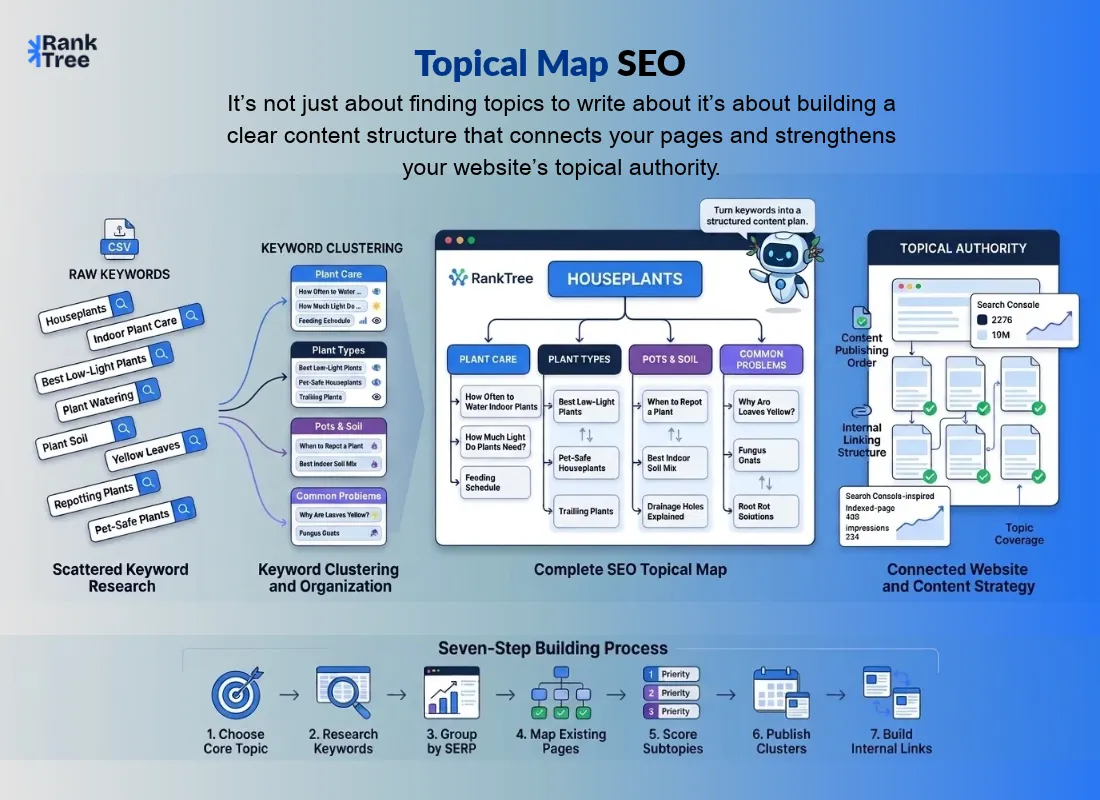
Here's a pattern most site owners know well: you publish fifty articles, each targeting a keyword you researched, and a year later your traffic graph is flat. The articles are not bad.
The problem is they were never a plan just a pile. Google does not hand authority to the site with the most posts.
It hands it to the site that covers a subject completely, in an order that makes sense, with every page connected to the next. That order has a name. It is called a topical map, and it is drawn before an article is written.
What is a topical map in SEO?
A topical map is the plan of every page a site needs to cover one subject completely: a core topic, its subtopics, the pages under each subtopic, and the internal links between them, drawn up before any page is written.
It turns one broad subject into a fixed list of pages and an order to write them in.
This guide explains what a topical map contains, how to build one in seven steps, which tools help, and how to check whether your map actually works.
What a Topical Map Actually Contains?
A topical map has four layers. Every layer answers a different question, and skipping one is how maps fall apart.
Layer | What it is | Example (subject: houseplants) |
Core topic (hub) | The one subject the whole map serves | Houseplants |
Subtopics | The main branches of that subject | Plant care, plant types, pots and soil, common problems |
Pages | One page per keyword group under each subtopic | How often to water, best low-light plants, when to repot |
Internal links | The paths between hub, subtopics, and pages | Every page links up to its subtopic page; subtopic pages link to the hub |
Two rules keep the structure clean. First, one keyword group gets one page. If two groups answer the same question, they belong on the same page, not two competing ones.
Second, no page on the map links to a page that does not exist yet. A map full of dead-end links is a plan nobody can follow.
Topical Map vs Topic Clusters vs Keyword Mapping
These three terms get mixed up constantly, so here is the short version. A topic cluster is a group of pages around one subject, usually one pillar page with supporting articles.
A topical map is the plan that contains those clusters: it shows every cluster a subject needs, not just one.
Keyword mapping is the smaller job inside the map: assigning each keyword to the page that should rank for it.
Concept | What it covers | What it produces |
Topical map | A whole subject, all clusters | A page list + publishing order + link plan |
Topic cluster | One branch of a subject | A pillar page + supporting articles |
Keyword mapping | Keywords → pages | One target page per keyword group |
If you already understand topic clusters, a topical map is the next level up: the document that decides which clusters to build, in what order and how they connect. Our comparison of topic clusters and keywords goes deeper on that distinction.
How to Build a Topical Map in 7 Steps?
You do not need expensive software to build a first map. You need a keyword list, a spreadsheet, and the discipline to finish one cluster before starting the next.
The steps below combine the method Ahrefs published in January 2025 including its scoring step with the practitioner process of grouping keywords by the page that already ranks for them.
Pick the core topic. Choose one subject the site can cover in full and that earns its place in the business. Every other entry on the map hangs off this choice, so a vague core topic produces a vague map.
List the keywords from the seed topic. Export a keyword list for the core topic from a keyword tool. This list is the raw material for everything that follows.
Group the keywords by the page that ranks for them. Look up the top result for each keyword. Keywords that share a ranking page belong together, because Google already treats them as one question. This is the same job a SERP-based clustering tool does.
Give each group one page, and mark what already exists. A group an existing page already answers is a page to improve, not a page to add. A finished map ends as two lists: pages to write and pages to revise.
Score each subtopic before you publish. Not every branch of the map deserves the same effort. Score each subtopic on three things: how relevant it is to your brand, how much business value it carries, and how much traffic its keywords can realistically bring. Publish the highest-scoring cluster first. This scoring step is what turns a map from a wish list into a publishing order.
Publish one cluster at a time. Finish a subtopic and all its articles before starting the next one. Publishing scattered pages across five half-finished clusters helps nobody.
Add the internal links once a cluster is published. Link each page up to its subtopic page, and link sideways only where the text genuinely needs it. Keep existing links in place when you refresh a post later.
That is the whole method at pillar level. The detailed walkthrough, with a worked scoring sheet, belongs in our how-to cluster article.
Worked Example: One Subject, One Map
Take the subject "houseplants" for a small gardening site. The map below is a made-up example, not a client result. Read it top down: hub first, then subtopic pages, then articles under each.
Houseplants (the hub page)
Plant care — How often to water indoor plants · How much light do houseplants need · Feeding schedule for potted plants
Plant types — Best low-light plants · Pet-safe houseplants · Trailing plants for shelves
Pots and soil — When to repot a houseplant · Best soil mix for indoor plants · Drainage holes: do they matter
Common problems — Why are my plant's leaves yellow · Fungus gnats: how to get rid of them · Root rot signs and fixes
Every page links up to its subtopic page, and subtopic pages link to the hub. The "yellow leaves" page links sideways to the "watering" page because the text needs it, not because the words match.
Swap houseplants for your own subject and the shape stays the same: one hub, a small set of subtopic pages, and two or three articles under each.
Built the RankTree way, the same map comes out of a simpler flow: upload a keyword CSV, let the clustering engine group it by SERP overlap and intent, arrange the groups into pillars, sub-pillars, and clusters on a visual map, then send each cluster to a content brief.
The free plan covers a first map of up to 50 keywords, which is enough to learn the shape before spending anything.
Best Tools for SEO Topical Maps
Tools differ in one important way: some only group keywords, while others carry the map through to briefs, drafts, and measurement.
Judge a tool by whether its output feeds your publishing workflow. A map that exports into a PDF gets admired. A map that exports into briefs gets written.
Tool | Best for | Starting price (Oct 2026 comparisons) | Free option |
RankTree | CSV → clusters → visual map → briefs | Free plan | 1 project, 50 keywords |
Keyword Insights | Dedicated clustering + briefs | $58/mo | No |
Surfer SEO | Map straight into writing | $49/mo | No |
Semrush | Mapping inside a full SEO suite | $139/mo | Limited free |
MarketMuse | Content gaps + topic modelling | See website | 10 queries/mo |
LowFruits | Low-competition clusters for small sites | $29.90/mo | No |
Keyword Cupid | Visual mind maps | $9.99/mo | No |
KeyClusters | Pay-as-you-go clustering | $9 per 1,000 keywords | 100 credits |
Floyi | Mapping + briefs + authority measurement | $99/mo | Pay-as-you-go tier |
Topical Map AI | Dedicated map + briefs from a niche | $56/mo | Example map free; single map $39 |
Search Atlas | Map → Content Genius → WordPress publish | Pro/Enterprise plans only | No free map tier |
Prices drift, so check the vendor's page before budgeting. The pattern in the table matters more than any single price: dedicated tools cost less than suites but do one job well, while suites bundle mapping with research you may already pay for. Pick the tool whose output matches your next step.
If your next step is writing, a tool that stops at a spreadsheet will slow you down. Try RankTree's Topical Map Generator free and see whether the map-to-brief flow fits your process before paying for a dedicated tool.
How to Check Whether Your Map Works?
A map is a hypothesis until the data confirms it. Check it in two places.
First, Google Search Console. Open the Performance report, go to the Pages tab, and count how many of the map's pages have impressions.
A page live for a full three months with zero impressions is a page to look at. Run the count per subtopic, and the map shows which parts of the subject are appearing in search results and which are not.
Second, crawl your own site and compare the crawl against the map. A page on the map that no crawl path reaches is a page no other page links to. That is an internal linking gap, not a content gap, and the map is exactly what finds it.
Refresh the map every three to six months, or sooner after a major product launch, a core update, or a shift in what your audience searches for. Stale maps send writers to topics nobody wants anymore.
5 Mistakes That Break a Topical Map
Treating the map as decoration. A map nobody opens after the planning meeting is not a plan. If it does not decide what gets written next, it failed.
One keyword, one page. Pages built around single keywords instead of keyword groups multiply thin pages that compete with each other. That is how sites end up with duplicate intent and folded pages.
Linking to pages that do not exist yet. Internal links should only point at live pages. Publish the cluster first, then link it.
Skipping intent labels. A map full of guides where buyers need product or comparison pages will not convert, no matter how complete it looks.
Never refreshing it. Subjects move. New questions appear, old ones die, competitors publish. A map from a year ago is a history document, not a strategy.
Topical Maps and AI Search
A well-structured map also helps with AI search, indirectly but genuinely. AI answers cite pages with clear entity coverage and strong internal linking, because those pages are easy to extract and easy to trust. A map builds both: complete coverage of a subject's entities, and links that show how those entities relate.
Use this simple test on any page the map produces: can an AI answer quote one clean paragraph from it that fully answers one question? If the answer is buried three sections deep, or spread across two pages, the page will not get cited. Write the answer first, then the detail. That is the same discipline featured snippets reward, and it is why snippet-optimised pages and AI-cited pages increasingly look alike.
No tool guarantees AI citations, and no map promises rankings. Treat AI visibility as a measured outcome over months, not a feature you switch on. The map earns it by making coverage complete and answers extractable.
Frequently Asked Questions
What is a topical map in SEO?
A topical map is the plan of every page a site needs to cover one subject: a core topic, its subtopics, the pages under each subtopic, and the internal links between them, drawn before the pages are written. It turns one broad subject into a fixed list of pages and an order to write them in.
How is a topical map different from a topic cluster?
A topic cluster is one branch of a subject, usually a pillar page with supporting articles. A topical map is the plan that contains all the clusters a subject needs, plus their publishing order and internal link paths.
How long does it take to build a topical map?
A first map for a small subject takes weeks, not days: roughly a week to research and a few weeks to build and validate, depending on the subject's size. The publishing that follows takes months. Plan the map once, then execute it one cluster at a time.
Can I build a topical map for free?
Yes, in part. RankTree's free plan covers a first map of up to 50 keywords, and several tools offer free tiers or credits. Free tiers suit small sites; larger sites need a paid tier for lists of thousands of keywords.
Do topical maps help with AI search?
Indirectly, yes. Complete entity coverage and deliberate internal linking make pages easier for AI engines to extract and cite. Floyi is one tool that tracks authority across Google and AI engines directly. Treat AI citations as a measured outcome over months, not a guaranteed result.
Final Words
A topical map is not another SEO document. It is the decision, made once, about what your site will cover, in what order, and how every page connects. Sites without one keep publishing and keep wondering why nothing compounds. Sites with one know exactly what to write next, what to revise, and what to leave alone.
Start small. Pick one subject you can cover in full, build its map with the seven steps above, publish one cluster completely, and check the result in Search Console. Then repeat. Authority is not declared. It is built, one finished cluster at a time.