Keyword Research Checklist: 12 Steps to Rank Higher
By RankTree Team · 2026-11-26 · Updated 2026-11-26
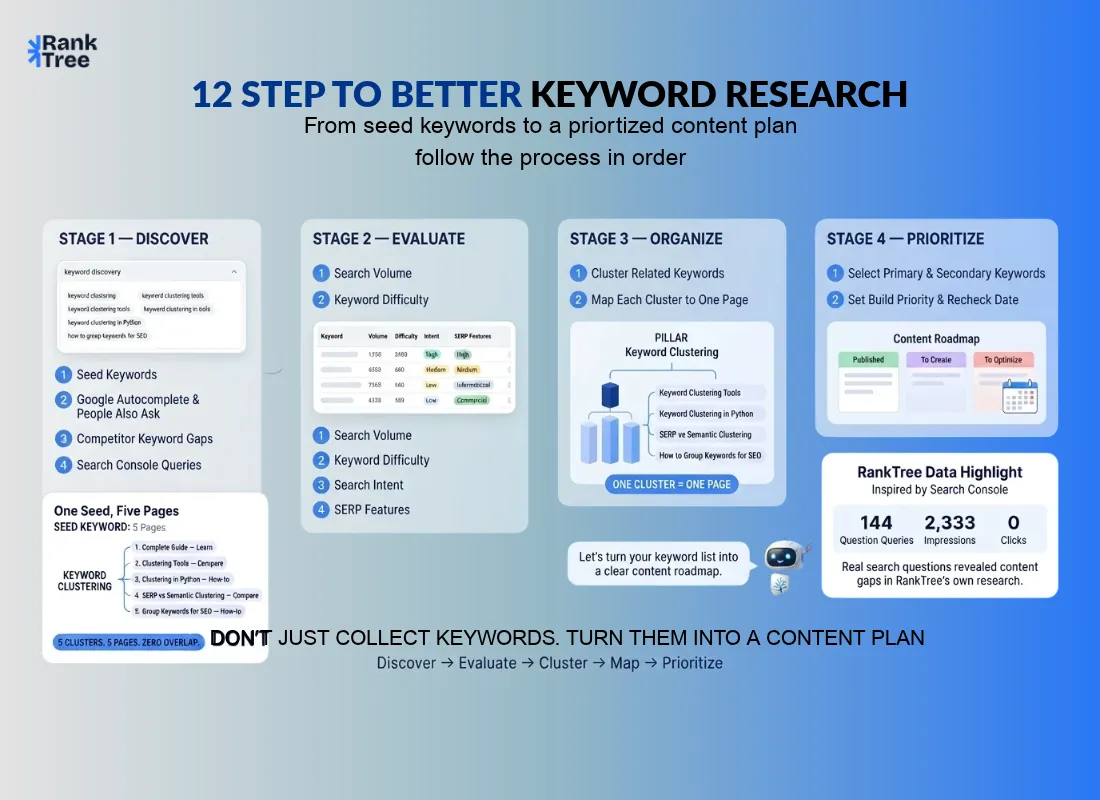
Most keyword research fails before it starts. People open a tool, type one seed, and copy the first 100 suggestions into a spreadsheet.
Then they write pages for keywords they cannot rank for. A keyword research checklist stops that.
It turns research into 12 steps in order: seeds, expansion, scoring, clustering, then one page per cluster. Follow it once per topic and you will know what to write.
What Is a Keyword Research Checklist?
A keyword research checklist is a list that takes you from a seed keyword to a content plan. It covers finding candidate keywords, scoring each one for volume, difficulty, and intent, grouping the survivors into clusters and mapping every cluster to exactly one page.
Before You Start: What You Need
You need four things: one topic, a spreadsheet or sheet, access to Search Console, and one to three hours.
Pick one topic, not your whole site. Keep a notes column beside every keyword: volume, difficulty, intent, cluster, and page. That sheet becomes your content plan.
The Keyword Research Checklist in 12 Steps
Work top to bottom. Do not score before you finish collecting, and do not cluster before you score intent. Tick a box only when its done-when line is true.
Step 1: Write 5 to 10 seed keywords
Start with what you sell and the problems you solve. A seed keyword is a broad term a customer would type. Write 5 to 10 by hand.
Done when: you have 5 to 10 seeds from your own knowledge.
Step 2: Expand with autocomplete and People Also Ask
Type each seed into Google. Note the autocomplete suggestions, then scroll to People Also Ask and note every question.
Done when: each seed has produced at least 5 new phrases.
Step 3: Pull your competitor gaps
Find the sites that rank for your seeds and check what else they rank for. Terms a rival ranks for are proven keywords. Keep only gaps that fit your topic. Find your competitors' keywords to run this step.
Done when: you have gap keywords, each checked for fit.
Step 4: Check Search Console queries
Open Performance, then Queries. These terms are half won. Sort by impressions: queries at positions 10 to 30, and queries at positions 4 to 15 with CTR below 3%. See how to find content keywords in Search Console.
Done when: your quick wins are listed with position and CTR.
Step 5: Score volume in bands, not exact numbers
You do not need an exact number. Mark each keyword high, medium, or low in Keyword Planner or any keyword tool. A band is enough to decide with.
Done when: every keyword has a volume band.
Step 6: Score difficulty from the live top 10
A difficulty score is a guess. The live top 10 is the truth. Search the exact keyword. Big brands mean a hard fight, small niche sites mean a winnable one.
Done when: you can say whether the top 10 looks beatable.
Step 7: Classify intent from the live top 10
Intent decides what page to build. Mostly guides means informational. Mostly best-of or comparison posts means commercial. Product or pricing pages mean transactional. Brand results mean navigational.
Done when: every keyword carries one intent label.
Step 8: Note the SERP features on each result
Look past the ten blue links. Does an AI Overview, a featured snippet, a People Also Ask box, or a video pack show? Each feature tells you which format to build.
Done when: each keyword notes its SERP features.
Step 9: Cluster keywords that share one intent
Group every keyword that one page could answer. Keywords with the same intent belong together. To cluster your list, cluster your keywords with RankTree's free tool. The free plan covers one project with up to 50 keywords.
Done when: every keyword sits in exactly one cluster.
Step 10: Map each cluster to exactly one page
Give each cluster one page and one status: Published, To Create, or To Optimize. Check each cluster against your existing pages. Track the rows: map each cluster to a page with a keyword map in a sheet.
Done when: every cluster has one page and one status.
Step 11: Pick one primary and its secondary keywords
Each page gets one primary keyword: the term with the most volume in its cluster. The rest become secondaries in subheadings and body text. See how to pick secondary keywords that support the primary without splitting the intent.
Done when: every page has one primary keyword.
Step 12: Prioritize, then set a recheck date
Rank your mapped clusters by revenue first, then by difficulty for your site. Ship low-difficulty transactional clusters first, commercial clusters next, informational guides last. Set a quarterly reminder to rerun steps 1 to 4.
Done when: your clusters are ordered by build priority.
A Worked Example: One Seed, Five Pages
Take the seed "keyword clustering". Expansion surfaced the tool, the how-to, and the comparison angles. Search Console showed impressions for the seed: "keyword clustering tool" at 638 and "keyword clustering" at 505 in the 28 days to 15 November 2026. Scoring cut the list to five clusters:
Cluster (primary keyword) | Intent | Page |
keyword clustering | Learn | Keyword clustering: complete guide |
keyword clustering tools | Compare | Keyword clustering tools |
keyword clustering in python | How-to | Keyword clustering in Python |
serp based vs semantic clustering | Compare | SERP vs semantic clustering |
how to group keywords for seo | How-to | How to group keywords for SEO |
Five clusters, five pages, zero overlap. The tool-intent cluster, "keyword clustering tool", maps to the tool page itself: transactional intent belongs on the product page.
How RankTree Runs This Checklist?
This checklist is not theory. It is how RankTree plans its own content. In the 28 days from 14 October to 10 November 2026, our question queries earned 2,333 impressions and zero clicks across 144 questions, at an average position of 64.
The questions were real demand we had not answered well enough. They went into the writing queue, and one became our article on finding lost keywords, published 14 November.
The same method found our next gap. On 16 November we grouped the sitemaps of Surfer, Keyword Insights, and Keyword Cupid. Surfer had an article on trending keywords while RankTree had none.
The word "trending" appeared zero times on our site. We published the trending-keywords article the next day. Let Search Console tell you what you already rank for, then let the gaps tell you what to write next.
4 Mistakes That Break the Checklist
1. Scoring difficulty before intent. A low-difficulty keyword is worthless if you build the wrong page type.
2. Publishing one page per keyword. Thin pages compete with each other instead of one strong clustered page.
3. Chasing volume alone. A 5,000-search keyword you cannot rank for is worth less than a 150-search term you can win this quarter.
4. Treating the recheck as optional. A list run once goes stale fast.
Final Words
Keyword research is not collecting keywords. It is deciding, in order, which searches deserve a page and which do not. Run the 12 steps once per topic, tick every box, and build in priority order. The list is the plan. The pages are the result.
FAQs
What is the correct order for a keyword research checklist?
Discover seeds first, then expand and check competitor gaps, then score each term for volume, difficulty, and intent, then organize survivors into clusters and map them to pages, then prioritize by value.
How many keywords should be on your checklist before you start writing?
Aim for 40 to 80 raw candidates after expansion, which usually collapses into 5 to 15 real clusters. You need a filtered list, not a huge one.
Do you need paid tools to finish this checklist?
No. Google autocomplete, People Also Ask, Keyword Planner, and Search Console cover the discover and evaluate steps free. A paid tool speeds up the competitor-gap step.
How often should you redo keyword research for the same site?
Revisit your keyword map every quarter, plus any time Search Console shows new queries earning impressions. Demand and intent drift, so a yearly checklist misses opportunities a competitor will catch first.