Topical Map for a Local Business: Build It in 6 Steps
By RankTree Team · 2026-11-23 · Updated 2026-11-23
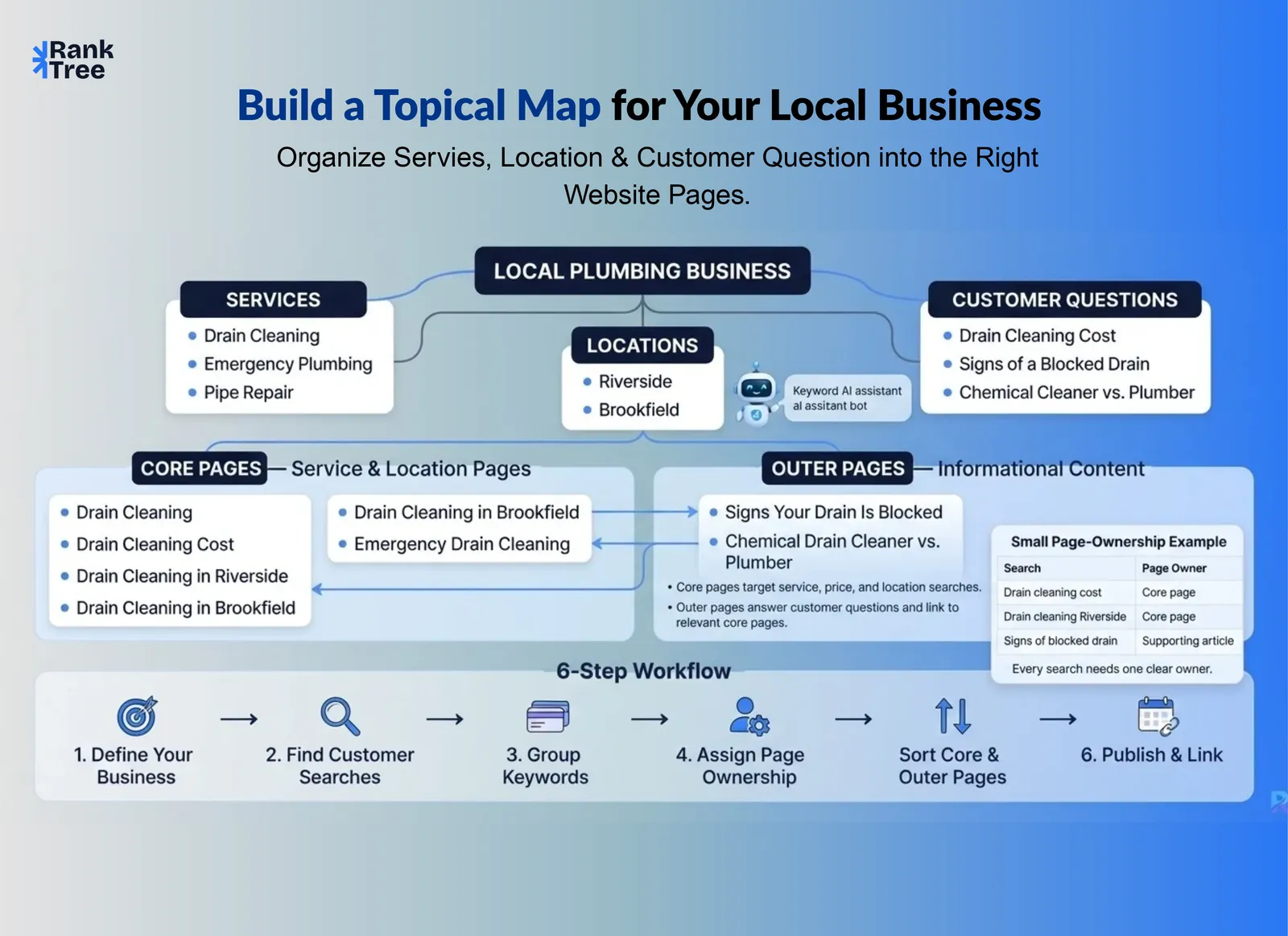
A local business website with one service page and a list of towns ranks for almost nothing. Google cannot tell what the business does, where it works, or which questions it answers.
A topical map fixes that. It lists every service, town, and customer question, and gives each one an owner.
This guide shows how to build a topical map for a local business in 6 steps, with a worked example.
What Is a Local Business Topical Map?
A local business topical map is the plan of every page a local business website needs. Each service, town, and customer question takes one row. Every row names one owner: a page, a section, or a sentence. Core pages sell. Outer pages answer and link to the core.
A topical map for local SEO starts from the business, not from a keyword list. For the generic method, see how to build a topical map in the pillar guide.
What Your Map Contains: Services, Towns, and Questions
Your map holds three kinds of rows: services, towns, and customer questions. Services are what you sell. Towns are where you serve. Questions are what customers ask before they call. Every row needs one owner and one intent. A row with no owner is a gap.
Sort the rows into two sections. The core section sells. The outer section answers.
Build the core first. Every outer page needs a core page to link to.
How to Build a Topical Map for a Local Business in 6 Steps?
Work the steps in order. Do not skip Step 2.
Step 1: Describe the business in one sentence
Write one sentence. Name what you sell, who you serve, and in which towns. Example: "We clear blocked drains for homes in Riverside and Brookfield." If a service does not fit the sentence, it stays out.
Step 2: List the searches customers use
Open Search Console and list the searches your site already earns. Add "People Also Ask" questions. Group them by service and town. Start by learning how local search intent works, so you list what customers actually search for.
Step 3: Group the keywords into clusters
One cluster equals one service, one town, or one question family. Do not mix them. "Drain cleaning cost" and "drain cleaning in Riverside" belong in different clusters. To cluster before you map, group your keywords into clusters first.
Step 4: Decide what earns a page, a section, or a sentence
A search earns a page when customers type it, it names a different service or town, and Google shows different results for it. A narrower question becomes a section. A single fact becomes a sentence.
Test each row: do customers type it? Does it name a different service or town? Does Google show different results? A search earns a page only when all three answers are yes. If no, make it a section or cut the row.
Record the reason for each decision. A map with no reasons is a list, not a plan.
Step 5: Sort the rows into core and outer sections
Place service, price, and town pages in the core. Place question and comparison pages in the outer section. Every outer page names the core page it links to. To track the rows, plan the pages in a sheet with the free template.
Step 6: Publish in order and link as you go
Publish the core pages first. Then publish the outer pages that link to them. Each new page links up to its core page. Update the sheet as you go.
A Worked Example: A Plumber's Drain-Cleaning Map
This example is illustrative. The business, the towns, and the page list are made up to show the method. A plumbing company in two towns sells one service: drain cleaning. Its map holds seven pages: four core, three outer. Every page links to the service page.
Page | Section | Owning search | Intent | Links to |
Drain cleaning | Core | drain cleaning | Commercial | None |
Drain cleaning cost | Core | how much does drain cleaning cost | Commercial | Drain cleaning |
Drain cleaning in Riverside | Core | drain cleaning riverside | Transactional | Drain cleaning |
Drain cleaning in Brookfield | Core | drain cleaning brookfield | Transactional | Drain cleaning |
Emergency drain cleaning | Core | emergency drain cleaning | Transactional | Drain cleaning |
Signs your drain is blocked | Outer | signs your drain is blocked | Informational | Drain cleaning |
Chemical drain cleaner vs plumber | Outer | chemical drain cleaner vs plumber | Informational | Drain cleaning |
Seven pages, seven intents, zero overlap.
How to Check Whether Your Local Map Works?
Check the map after three months, not three days. Open Search Console and read it per page, not per site. Are town pages earning impressions? Are question pages earning clicks? Pages with impressions but no clicks need better titles, not new pages.
Measure calls too. A town page earns its keep with quote requests, not just impressions.
This check works on our own site. On 16 November 2026, we grouped the sitemaps of Surfer, Keyword Insights, and Keyword Cupid. The gap: Surfer had an article on trending keywords, and RankTree had none.
We published it the next day. Our question queries earned 2,333 impressions and zero clicks across 144 questions.
Those questions went straight into the writing queue. Our topical-map cluster grew the same way: pillar, competitor map, template, then AI map, one page at a time.
Tools to Build Your Local Map
You need three things: your searches, a sheet, and a grouping tool. Search Console gives you the searches you already earn. A sheet holds the rows. A generator groups the keywords into clusters and labels the intent. Build your local seo topical map in a sheet first, then let the tool group the rows.
Tool | Best for | Free option | Watch out for |
RankTree Topical Map Generator | A map from a keyword CSV | Free: CSV upload, AI clustering, intent labels, export | Needs your keyword list |
Google Search Console | Searches your site earns | Free | Shows past data only |
Google Keyword Planner | Service + town volumes | Free | Needs a Google Ads account |
To generate the map from your list, generate your map free with RankTree. Upload a keyword CSV. The AI applies semantic clustering and intent classification. It builds the pillar and cluster pages, and exports a ready, prioritized, intent-labeled roadmap.
5 Mistakes That Break a Local Business Map
Most local maps fail the same five ways. They multiply every service by every town. They list all towns on one page. They copy town pages with only the town name swapped. They publish question pages with no core page to link to. They start with the outer section.
1. Building a service x town grid. Every service in every town is a grid of thin pages. Google's spam policies call them doorway pages.
2. Listing every town on one page. One page with one title cannot serve ten towns. Split the towns that earn searches into their own pages.
3. Copying town pages. The same text with only the town name swapped has no proof. Each town page needs its own services, questions, and proof.
4. Publishing outer pages with no core page. A question page that links nowhere is a loose page. Build the core page first.
5. Starting with the outer section. Questions bring readers, but the core pages bring calls. Publish the core first.
Final Words
Start with one service and two towns. List the searches, test each row, and sort the pages into core and outer. Publish the core first. Then check the map after three months. A topical map for a local business is not a document you finish once. It is the plan your website grows by, one page at a time.
FAQs
Does a small local business need a topical map?
Yes, when it sells more than one service or serves more than one town. A business with one service in one town needs only a few rows.
How many pages should a local business topical map have?
No fixed number applies. A page earns its place when a search passes the page test. The plumber example holds seven pages for one service in two towns.
Can I build a local business topical map for free?
Yes. RankTree's free generator builds the pillar-cluster map with intent labels from your keyword CSV. Search Console and Keyword Planner are free too.
Should every town get its own page?
No. A town earns its own page when customers search for your service there. A page that lists every town serves no town. Never multiply every service by every town into a grid.
How do I know if my local map works?
Check it after three months in Search Console. Read it per page: town pages should earn impressions, question pages should earn clicks, and core pages should earn calls.