How to Build a Topical Map with AI (Free Method + Prompts)
By RankTree Team · 2026-11-19 · Updated 2026-11-19
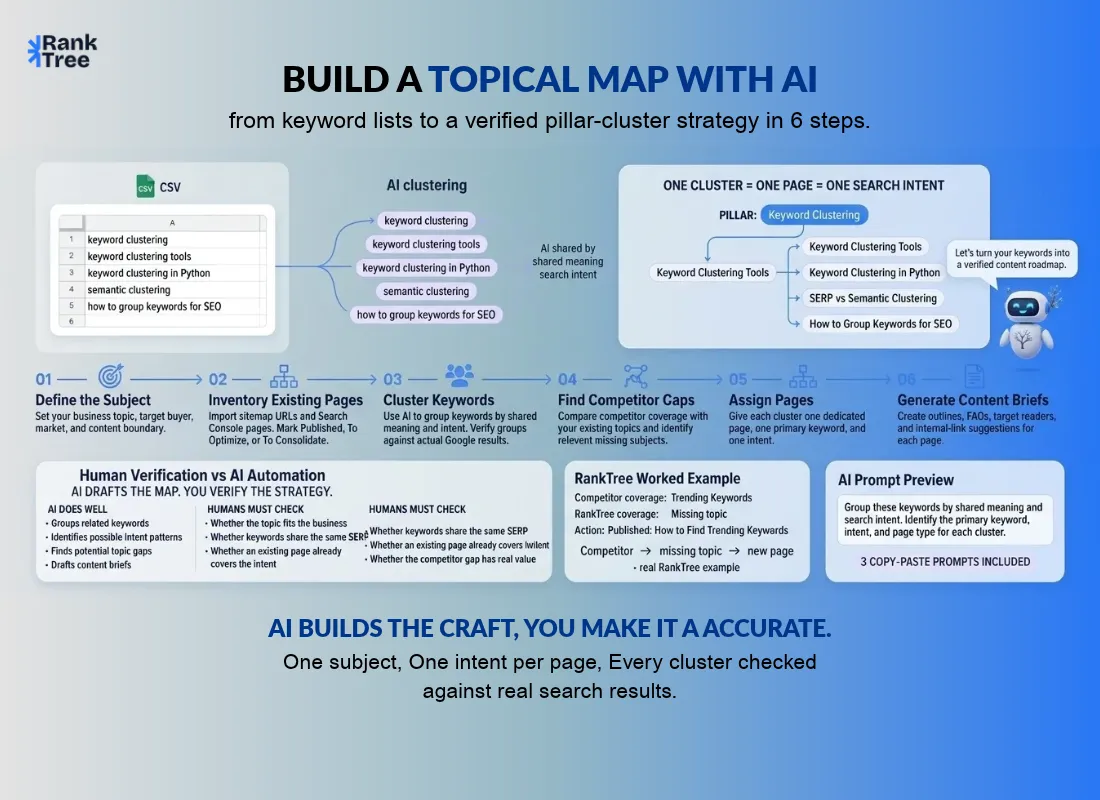
An AI tool can draft your topical map in minutes. It cannot decide what your site should own. You set the subject and the boundary.
AI groups the keywords, spots the gaps, and drafts the briefs. You check every group against real results first.
This guide shows how to build a topical map with AI in 6 steps, the exact prompts, and a worked example from RankTree's own map.
What Is an AI-Built Topical Map?
An AI-built topical map is a pillar-cluster plan that an AI tool drafts from your keyword list and your existing pages.
It groups keywords by meaning and intent, names one pillar page per subject, and lists the supporting pages around it. AI is fast at grouping keywords, spotting intent patterns, and drafting briefs.
It is weak at inventing topics with no demand, merging distinct intents, and ignoring your existing pages. You stay in charge of the subject and every page decision.
What You Need Before You Start?
You need four things: a keyword list for one subject as a CSV export (50 to 500 keywords), your existing URLs, two or three competitor sites, and one commercial subject in one sentence. Start with one subject, not the whole site. Finish one cluster before you start the next.
How to Build a Topical Map with AI in 6 Steps?
Step 1: Set the subject and the boundary
Before you touch any tool, write one sentence. Name the product or service, the buyer, the market, and the next action. Example: "Help SEO beginners learn keyword clustering and try RankTree's free clustering tool."
If a topic does not serve the buyer in that sentence, it stays out. A vague subject produces a vague map. For the manual version, see how to build a topical map in the pillar guide.
Step 2: Export your existing pages first
Pull your sitemap and Search Console pages. Mark each page Published, To Optimize, or To Consolidate. Check every planned cluster against this list. Never let AI plan a new page for an intent you already cover.
Step 3: Cluster the keywords with AI
Feed the CSV to a generator or paste the list into a chat tool with Prompt 1 below. The AI groups keywords by meaning and intent. Then verify each group by hand: look up the top result for the group's main keyword.
Keywords that share a ranking page belong together. If two keywords rank on different pages, split the group. To cluster before you map, group your keywords into clusters first.
Step 4: Add the competitor gaps
Get a rival's map from its sitemap, the site: operator, and its internal link anchors. Group their keywords the same way. The gaps are the topics they cover that you do not.
Rank each gap by the traffic their pages earn and its fit with your one-sentence subject. Park any gap that fails the fit test. A gap outside your subject is a distraction. The full rival method is in our guide to get a competitor's topical map.
Step 5: Turn clusters into pages
Give each cluster one page and one intent. Name the pillar page and each cluster page under it. Mark each one Published, To Create, or To Optimize in your sheet. Here is what that looks like for keyword clustering:
Page | Intent | Status |
Keyword clustering: complete guide (pillar) | Learn | Published |
Keyword clustering tools | Compare | Published |
Keyword clustering in Python | How-to | Published |
SERP vs semantic clustering | Compare | Published |
How to group keywords for SEO | How-to | Published |
Five pages, five intents, zero overlap. If two rows answer the same question, merge them. To track the rows, plan the pages in a sheet with the free template.
Step 6: Generate briefs and publish in order
Write one brief per page: target reader, intent, a 6-section outline, three FAQs from real searches, and the internal links it must carry. Publish in this order: refresh the pillar first, then the clusters that fill the biggest gaps.
To generate the map from your list, generate your map free with RankTree. Upload a keyword CSV. The AI clusters it by meaning and intent, builds the pillar and cluster pages, and exports a ready roadmap.
A Worked Example: How RankTree Found Its Own Gap?
On 16 November 2026, we grouped the sitemaps of Surfer, Keyword Insights, and Keyword Cupid. The AI grouped their pages fast. The hand check found the gap: Surfer had an article on trending keywords, and RankTree had none.
The word "trending" appeared zero times on our site. We published "How to Find Trending Keywords" the next day, 17 November. The lesson: a gap only matters when you check it against real coverage and your own missing pages.
Copy-Paste Prompts for Each Step
Replace only the bracketed parts.
Prompt 1: Build the map. "You are an SEO strategist. Here is my keyword list: [paste list]. Group these keywords into clusters by shared meaning and search intent. For each cluster, give: name, primary keyword, intent, page type, and one sentence on what the page must answer. Skip clusters under 3 keywords. Flag any keyword that fits two clusters."
Prompt 2: Check the gaps. "Here is my sitemap: [paste URLs]. Here is a competitor's sitemap: [paste URLs]. List the topics the competitor covers that I do not. Rank them by traffic value and fit with my subject: [one-sentence subject]."
Prompt 3: Write the brief. "Write a content brief for this page: [cluster name, primary keyword, intent]. Include: target reader, intent, a 6-section outline, 3 FAQs, internal links to [pillar URL], and one unique angle no competitor page covers."
AI Topical Map Tools Compared
Tool | Best for | Free option | Watch out for |
RankTree Topical Map Generator | A pillar-cluster map from a keyword CSV | Free: upload a CSV, AI clustering, intent labels, exportable roadmap | Needs your keyword list |
Surfer | On-page signals per cluster node | Paid; check the vendor page | Not a full map builder |
SemanticOS | A full map from your domain | 2 hours free; then trial on your Claude API key | Needs your own Claude API key |
ChatGPT or Claude | Custom prompts and taxonomy thinking | Free tiers exist | No SEO data; verify every group by hand |
Prices change. Check the vendor page before you pay.
5 Mistakes That Break an AI-Built Map
Accepting every AI suggestion. AI invents topics with no search demand. Check each cluster against real search data.
One keyword equals one page. Thin pages multiply. One cluster equals one page, and one page serves one intent.
Skipping the existing-page inventory. Skip Step 2 and you plan pages you already have.
Letting competitor headings dictate the structure. Their map serves their business, not yours. Use their gaps as input, never as your outline.
Publishing without a human intent check. A page with mixed intent answers no one fully. Ask: what is the one job this page does?
How to Check Whether Your AI Map Works?
Check the map after three months, not three days. Open Search Console and read it per cluster. Are impressions rising? Are new queries appearing that the map did not plan for? Pages with impressions but no clicks need better titles, not new pages. Repeat the gap check every quarter.
On RankTree, this check works. Our question queries earned 2,333 impressions and zero clicks across 144 questions. Those questions went straight into the writing queue. A map is a living document.
Final Words
AI builds the draft map in minutes. You make it true: one subject, one intent per page, every group checked against real results. Start with one subject, run the six steps, and check the map after three months. The map is not the goal. The pages are.
FAQs
Can AI build a topical map from my existing website?
Yes. Give the AI your sitemap and keyword list. It organizes your URLs, keyword themes, competitor coverage, and missing subtopics into a draft. Review it for business fit and duplicates before you publish.
How many pages should a topical cluster have?
Begin with a pillar and 6 to 15 supporting pages. Add pages only when search data or customer questions support them.
Can I build a topical map with AI for free?
Yes. RankTree's free topical map generator builds the pillar-cluster map with intent labels from your keyword CSV. ChatGPT and Claude have free tiers for the prompts here.
Does an AI-built map help content appear in AI search results?
Indirectly, yes. AI answers cite pages with clear entity coverage and strong internal linking. A map builds both. Note: Google has no general topical authority score. Its topic authority system covers news only.
Do I still need to check the map by hand?
Yes. AI groups fast and invents topics. Check each cluster against the top-ranking page for its main keyword. If two keywords rank on different pages, split the group.