SEO URL Structure: Best Practices Examples & Checklist
By RankTree Team · 2026-10-03 · Updated 2026-10-03
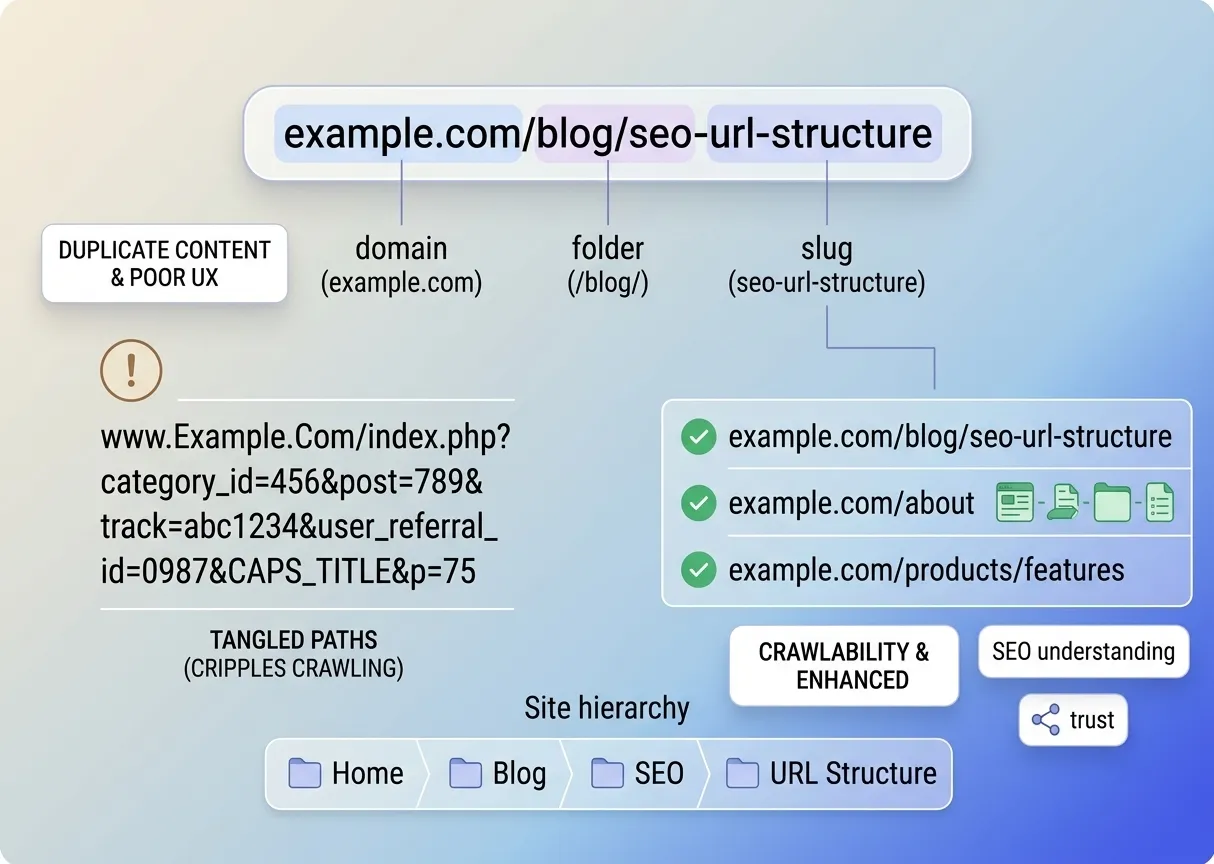
SEO URL structure is the way you organize and write your page addresses so people and search engines can tell what each page is about and where it sits on your site. A good structure is short descriptive lowercase hyphen separated grouped logically in folders and stable over time.
Most sites set their URLs once and never think about them again. That is fine until you have 200 pages three URL styles and a redirect chain nobody remembers building. This guide shows you how to get it right from the start and how to fix it safely if you did not.
What Is URL Structure in SEO?
URL structure is the way you organize and write the web addresses of your pages. It covers the folders the slug and any parameters in the address.
A good structure tells people and search engines what a page is about and where it sits on your site.
For example:
ranktree.io/blog/seo-url-structure
Here, "blog" is the folder and "seo-url-structure" is the slug. Together they say: this is a blog article about SEO URL structure.
Why Is URL Structure Important for SEO?
URL structure helps in a few practical ways.
First it helps users. A readable URL tells people what to expect before they click and it looks trustworthy when shared.
Second it helps search engines. The words in a URL give Google a small extra clue about the page's topic. This is a minor signal not a major ranking factor.
Third it keeps your site crawlable. Clean URLs reduce the chance of creating duplicate or near-duplicate pages by accident which is the bigger SEO risk.
Finally it makes your site easier to manage. A consistent pattern makes audits redirects and migrations far simpler.
The Parts of a URL
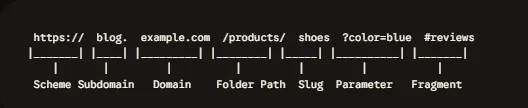
Every URL is made of several parts. Here is what to decide for each one.
Scheme
The scheme is the protocol at the start of the URL usually https://.
Always use HTTPS. It encrypts the connection and browsers warn users when a site does not have it.
Subdomain
A subdomain comes before the main domain like help.example.com.
Use subdomains for genuinely separate sections such as a help center or a regional site. For most blogs a subfolder is simpler to manage.
Domain Name
The domain name is your site's main address like example.com.
Pick one version (www or non-www) and redirect the other. Neither has an SEO advantage. Inconsistency is the real problem.
Folder and Slug
The folder groups related pages. The slug identifies one page.
For example, in example.com/blog/url-structure "blog" is the folder and "url-structure" is the slug.
This is where most of your URL structure decisions happen.
Parameters
Parameters start with a question mark and change or track a page such as ?sort=price or ?utm_source=email.
They are useful but too many of them create duplicate URLs. We cover how to handle them below.
Fragment
A fragment starts with a hash (#) and jumps to a section within a page such as #checklist.
Google generally does not treat fragments as separate pages. Do not use them to load different content.
Types of URL Structures
Most sites use one of three structures.
Flat Structure
A flat structure keeps pages close to the root with few or no folders.
For example:
example.com/keyword-clustering-tool
Flat URLs are short and work well for key pages like products, pricing and landing pages.
Hierarchical (Nested) Structure
A hierarchical structure uses folders to show how content is organized.
For example:
example.com/learn/seo/url
Nested URLs suit sites with real stable categories such as large guides or product catalogs. The trade-off is that moving a page to a new category changes its URL.
Dynamic (Parameter-Based) Structure
A dynamic URL builds the page from parameters instead of readable words.
For example:
example.com/page.php?id=456&cat=12
These are hard to read and easy to duplicate. Use readable words wherever you can.
How Real Sites Do It?
Site | URL | Pattern |
Semrush | One folder, then slug | |
Moz | Two folders, then slug | |
The Brand Brew | thebrandbrew.ca/solutions/branding | One folder, then slug |
Google Search Central | developers.google.com/search/docs/crawling-indexing/url-structure | Deeply nested documentation |
There is no single correct pattern. What matters is picking one per page type and applying it everywhere.
8 URL Structure Best Practices
1. Use HTTPS
Install an SSL certificate so every URL starts with "https". Make sure HTTP versions redirect to HTTPS.
2. Keep URLs Short and Readable
Make URLs easy to read type and share.
For example use example.com/blog/seo-url-structure instead of example.com/blog/the-complete-and-ultimate-guide-to-seo-friendly-url-structure.
Google does not set an official length limit. If a slug reads like a sentence shorten it.
3. Describe the Page in Plain Words
Use clear words that match the page's topic and include the primary keyword once. If you need help choosing it read our guide on how to choose a primary keyword.
Avoid IDs codes and abbreviations. Also leave out years and numbers that will go stale.
For example use /blog/seo-tips instead of /blog/2026-10-seo-tips. You can then update the article without changing its address.
4. Use Hyphens Not Underscores
Separate words with hyphens (-). Google recommends this because it helps identify the individual words in a URL.
For example use /seo-url-structure instead of /seo_url_structure or /seourlstructure.
5. Stick to Lowercase
URLs are case-sensitive. /About and /about can be treated as two different pages.
Use lowercase everywhere and redirect any uppercase versions.
6. Keep Folder Depth Shallow
Use as few folders as your site needs. One level is enough for most blogs and SaaS sites.
Add depth only when the hierarchy is real and unlikely to change. Breadcrumbs and internal links can show hierarchy even when URLs stay flat.
7. Handle Parameters Carefully
Keep parameters to the minimum and remove any that do not change the content like session IDs. If a parameter creates a duplicate of a clean page point a canonical tag to the clean version.
For filters that can combine endlessly such as on an online store consider blocking those URLs with robots.txt so Google does not waste crawl effort on them.
8. Be Consistent
Search engines can treat these as separate URLs:
http and https
www and non-www
With and without a trailing slash
Choose one version of each. Then make sure your redirects canonical tags internal links and sitemap all agree.
How to Change URLs Without Losing Rankings?
Do not change an indexed URL just to make it look nicer. It already has links, impressions and history.
Change a URL only when there is a real reason such as duplicates a misleading slug or a site migration.
When you do:
Map each old URL to one new URL. Choose the closest matching page.
Set up a 301 redirect from old to new. Google's redirect guidance explains how.
Avoid redirect chains. Point directly to the final page.
Update internal links canonical tags and your sitemap to the new URL.
Monitor Search Console for crawl errors and 404s over the following weeks.
If two pages target the same topic fix that first with keyword mapping before you touch any URLs.
How to Check Your URLs for Issues?
Reviewing URLs by hand gets slow as your site grows. Use this process:
Crawl your site with an SEO crawler and export all URLs.
Sort by pattern. Look for uppercase letters, underscores IDs and parameters.
Check for duplicates. Compare HTTP vs HTTPS, www vs non-www and trailing slash variants.
Review Search Console. The Pages report shows which URLs Google indexed and which it excluded.
Look for redirect chains and fix them.
Compare slugs against your keyword plan. Each page should own one primary keyword and no two pages should compete for the same one.
For step 6 the keyword clustering tool groups your keywords by intent so you can assign each cluster to one page before you decide its URL.
Common URL structure mistakes
Keyword stuffing in the slug such as /seo url seo friendly url best practices seo. Say it once.
Mixing patterns: /blog/ for some articles /resources/ for others root level for the rest.
Deep folders that force a URL change whenever you reorganize.
Two pages with the same topic and different slugs. This is a keyword mapping problem not a URL problem. Fix it with a keyword optimization strategy before you touch redirects.
Changing URLs without redirects.
FAQs
Does URL structure affect SEO?
Slightly. Descriptive URLs give a small relevance clue but the real gains are cleaner crawling and fewer duplicate page problems.
How long should a URL be?
There is no official limit. Keep slugs short enough to read at a glance and avoid padding them with filler words.
Should I include my keyword in the URL?
Yes once naturally. Do not repeat it or stuff variations in.
Should I use dates in blog URLs?
Usually not. A date in the URL makes updating and republishing awkward. Keep dates for content where the date is genuinely part of the topic.
Subdomain or subfolder?
Subfolders are simpler to manage and keep everything under one host. Subdomains work for genuinely separate products or regional sites. Either is fine if you stay consistent.